Actions
The ungleich VM console
- Table of contents
- The ungleich VM console
1. System Architecture
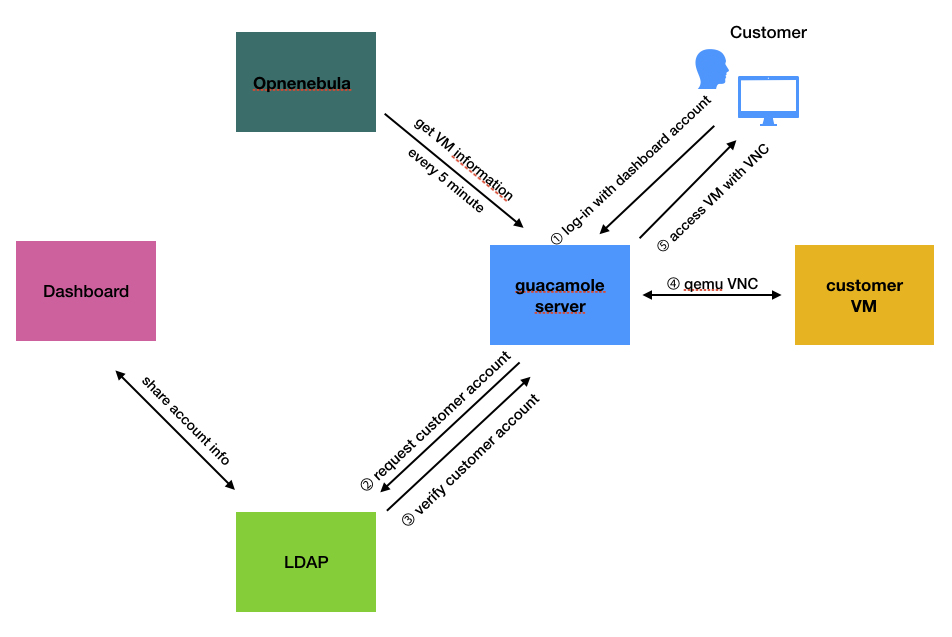
This service supports accessing console of your VM through guacamole service.
And To log-in VM console web needs datacenterlight.ch account. User's accounts are syncronized with LDAP.
2. Set guacamole server
- run cdist
- in manifest for centos
……
desktop.ungleich.ch)
        __guacamole_centos  --ldap-hostname 'ldap server url' \
          --ldap-port '636' \
          --ldap-encryption-method 'ssl' \
          --ldap-user-base-dn 'ou=XXX,dc=ungleich,dc=ch' \
          --ldap-search-bind-password ‘refer to pass' \
          --ldap-search-bind-dn 'cn=XXXXX,dc=ungleich,dc=ch' \
          --ldap-username-attribute 'uid' \
          --postgresql-hostname 'localhost' \
          --postgresql-username 'USER name' \
          --postgresql-database 'DB-name' \
          --postgresql-port     'XXXX' \
          --postgresql-password 'password' \
          --TOTP \
          --guacd-db 'postgresql'
- in manifest for alpine (only support postgresql)
……
desktop.ungleich.ch)
        _ungleich_vnc_console  --ldap-hostname 'ldap server url' \
          --ldap-port '636' \
          --ldap-encryption-method 'ssl' \
          --ldap-user-base-dn 'ou=XXX,dc=ungleich,dc=ch' \
          --ldap-search-bind-password ‘refer to pass' \
          --ldap-search-bind-dn 'cn=XXXXX,dc=ungleich,dc=ch' \
          --ldap-username-attribute 'uid' \
          --postgresql-hostname 'localhost' \
          --postgresql-username 'USER name' \
          --postgresql-database 'DB-name' \
          --postgresql-port     'XXXX' \
          --postgresql-password 'password' \
          --TOTP \
          --opn-hostname 'opennebula host-server name' \
          --opn-key 'opennebula access key' \
          --guacd-db 'postgresql'
3. Create VNC connection for VM
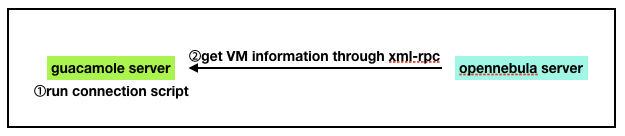
1) git clone ungleich-tool(vnc_console_connection, it has cloned by __ungleich_vnc_console cdist)
2) set vnc connection automatically on vnc_console server
(1) vnc connection python
- ldap_list.py : get user list from ldap server
- db_export.py : update postgresql database with vnc connection info
- get_info.py : create vnc_connecion info
- config.py : config parameter
(2) create crontab
*/5 * * * * python3 /opt/ungleich-tools/vnc_console_connection/get_info.py # __cron/console_connection
4. Monitoring VNC console
- We are monitoring VNC console with prometheus.
- run cdist __dcl_monitoring_server(update prometheus.yml)
※User VM information is synchronized with the VM console every 5 minute. If you create VM right now, you can access VM console after 5 minutes.(vnc connection script takes about in 15 seconds.)
Updated by Jin-Guk Kwon over 6 years ago · 6 revisions