Task #6068
closedMove redash (lorawan.ungleich.ch) to a new IPv6 only VM in place6
40%
Description
Hey Dongwoo,
this is a great task for practising. It's a lot of small and easy steps to ensure everything works.
When migrating to a new IPv6 only VM, we might need to change our setup from "TTN sends data via http post" to "We poll data from TTN via ? (where ? might be MQTT)"
- Create a new VM
- 10GB SSD, 100 GB HDD
- Setup DNS for the VM: lorawan-dev.ungleich.ch
- Setup redash (can be OS or docker, latter might be easier)
- Setup postgresql
- Setup a new user
- Clone https://code.ungleich.ch/ungleich-public/lorawan/
- Login to https://www.thethingsnetwork.org/ (= TTN)
- Let Nico know which username you have at TTN
- Create a new integration so that you can get the data
- Create a new script similar to ttnv2receiver.py (from https://code.ungleich.ch/ungleich-public/lorawan/) that polls the data and writes it into the database
- Install monit and configure monit to ensure that the script is always working
- Configure redash to use LDAP based login
At this point we should have a full replacement of lorawan.ungleich.ch. Now we make things pretty:
- Put all steps into cdist
- Create a new VM
- Setup DNS lorawan-new.ungleich.ch
- Only run cdist against it
- The new VM should be in the same state as the previous VM
- Delete the previous VM lorawan-dev.ungleich.ch
Now we do the migration:
- Delete database on lorawan-new.ungleich.ch (i.e. make it clean)
- Export old data from lorawan.ungleich.ch to lorawan-new.ungleich.ch
- Ensure that new data is still added on lorawan-new.ungleich.ch
- If everything is good:
- Delete old VM
- Rename new VM in DNS to lorawan.ungleich.ch
Files


DK Updated by Dong Woo Koh almost 8 years ago
- Status changed from New to Seen
Thanks!
DK Updated by Dong Woo Koh almost 8 years ago
- Status changed from Seen to In Progress
NS Updated by Nico Schottelius almost 8 years ago
Attention: please use a IPv6 only VM
#.Oops! I made VM again (with devuan-ascii/ ipv6 only / 10G Memory /100GB HDD)
ID    23769
Name    lorawan-dev.ungleich.ch
State    ACTIVE
LCM State    RUNNING
Host    server2.place6.ungleich.ch
IP    2a0a:e5c0:2:12:400:f0ff:fea9:c3d7
Start time    19:19:46 19/11/2018
Deploy ID    one-23769
#. Adding lorawan-dev into dns zone file :"ungleich.ch"
............
; temporary
lorawan         IN A       185.203.112.22
lorawan         IN AAAA    2a0a:e5c0:0:2:400:b3ff:fe39:795b

lorawan-dev     IN AAAA    2a0a:e5c0:2:12:400:f0ff:fea9:c3d7  <-----
............
#.Adding lorawan-dev.ungleich.ch at zone file:ungleich.ch
[root@cephmaster zones]# git config --global user.name "dongwoo.koh"
[root@cephmaster zones]# git config --global user.email "metamo7@gmail.com"
[root@cephmaster zones]# git commit -m "[DNS] Adding lorawan-dev.ungleich.ch at zone file:ungleich.ch"
[ungleich 1cf5622] [DNS] Adding lorawan-dev.ungleich.ch at zone file:ungleich.ch
 1 file changed, 1 insertion(+)
[root@cephmaster zones]#  git push
Counting objects: 13, done.
Delta compression using up to 4 threads.
Compressing objects: 100% (7/7), done.
Writing objects: 100% (7/7), 604 bytes | 0 bytes/s, done.
Total 7 (delta 6), reused 0 (delta 0)
remote: Project 'ungleich/dot-cdist' was moved to 'ungleich-intern/dot-cdist'.
remote:
remote: Please update your Git remote:
remote:
remote:   git remote set-url origin git@code.ungleich.ch:ungleich-intern/dot-cdist.git
To git@code.ungleich.ch:ungleich/dot-cdist.git
   fdcc544..1cf5622  ungleich -> ungleich
DK Updated by Dong Woo Koh almost 8 years ago
#.
#.To install PostgreSQL, as well as the necessary server software, run the following command:
#.Configure PostgreSQL to start up upon server boot.
#.
DK Updated by Dong Woo Koh almost 8 years ago
#.
root@devuan:~# curl -fsSL https://get.docker.com/ | sudo sh
sudo: unable to resolve host devuan <---------- checked
# Executing docker install script, commit: 46dc063
+ sh -c apt-get update -qq >/dev/null
+ sh -c apt-get install -y -qq apt-transport-https ca-certificates curl >/dev/null
+ sh -c curl -fsSL "https://download.docker.com/linux/debian/gpg" | apt-key add -qq - >/dev/null
Warning: apt-key output should not be parsed (stdout is not a terminal)
+ sh -c echo "deb [arch=amd64] https://download.docker.com/linux/debian stretch edge" > /etc/apt/sources.list.d/docker.list
+ [ debian = debian ]
+ [ stretch = wheezy ]
+ sh -c apt-get update -qq >/dev/null
+ sh -c apt-get install -y -qq --no-install-recommends docker-ce >/dev/null
If you would like to use Docker as a non-root user, you should now consider
adding your user to the "docker" group with something like:

  sudo usermod -aG docker your-user

Remember that you will have to log out and back in for this to take effect!

WARNING: Adding a user to the "docker" group will grant the ability to run
         containers which can be used to obtain root privileges on the
         docker host.
         Refer to https://docs.docker.com/engine/security/security/#docker-daemon-attack-surface
         for more information.
#
#. error
root@devuan:~#  docker images
Cannot connect to the Docker daemon at unix:///var/run/docker.sock. Is the docker daemon running?
#. error
#.error
root@devuan:/etc/init.d#  /etc/init.d/docker start
bash: /etc/init.d/docker: No such file or directory
#.Devuan is OLD System?
root@devuan:/etc/init.d# curl -L https://github.com/docker/machine/releases/download/v0.16.0/docker-machine-`uname -s`-`uname -m` >/tmp/docker-machine
  % Total    % Received % Xferd  Average Speed   Time    Time     Time  Current
                                 Dload  Upload   Total   Spent    Left  Speed
100   617    0   617    0     0   1835      0 --:--:-- --:--:-- --:--:--  1836
100 26.8M  100 26.8M    0     0  8530k      0  0:00:03  0:00:03 --:--:-- 14.4M
root@devuan:/etc/init.d# chmod +x /tmp/docker-machine
root@devuan:/etc/init.d# sudo cp /tmp/docker-machine /usr/local/bin/docker-machine
#.Reference Links
http://www.kwangsiklee.com/2017/05/%EC%89%BD%EA%B2%8C-%EB%94%B0%EB%9D%BC%ED%95%98%EB%8A%94-%EC%9A%B0%EB%B6%84%ED%88%AC%EC%97%90-docker-engine-docker-compose-%EC%84%A4%EC%B9%98%ED%95%98%EA%B8%B0/
=======================================================
#.Holding Docker Installation in Devuan.............
=======================================================
DK Updated by Dong Woo Koh almost 8 years ago
#.
root@devuan:~# git clone https://github.com/getredash/redash
Cloning into 'redash'...
remote: Enumerating objects: 129, done.
remote: Counting objects: 100% (129/129), done.
remote: Compressing objects: 100% (104/104), done.
remote: Total 36314 (delta 60), reused 55 (delta 25), pack-reused 36185
Receiving objects: 100% (36314/36314), 12.06 MiB | 10.78 MiB/s, done.
Resolving deltas: 100% (25570/25570), done.
root@devuan:~# ls
redash
#. Here default configuration
root@devuan:~/redash# cat docker-compose.yml
# This configuration file is for **development** setup. For production, refer to
# docker-compose.production.yml.
version: '3'
services:
  server:
    build: .
    command: dev_server
    depends_on:
      - postgres
      - redis
    ports:
      - "5000:5000"               <--------- Checked
    volumes:                      <--------- Checked
      - ".:/app"
    environment:
      PYTHONUNBUFFERED: 0
      REDASH_LOG_LEVEL: "INFO"
      REDASH_REDIS_URL: "redis://redis:6379/0"
      REDASH_DATABASE_URL: "postgresql://postgres@postgres/postgres"
  worker:
    build: .
    command: scheduler
    volumes:                       <--------- Checked
      - ".:/app"
    depends_on:
      - server
    environment:
      PYTHONUNBUFFERED: 0
      REDASH_LOG_LEVEL: "INFO"
      REDASH_REDIS_URL: "redis://redis:6379/0"
      REDASH_DATABASE_URL: "postgresql://postgres@postgres/postgres"
      QUEUES: "queries,scheduled_queries,celery"
      WORKERS_COUNT: 2
  redis:
    image: redis:3-alpine
    restart: unless-stopped
  postgres:
    image: postgres:9.5-alpine
    # The following turns the DB into less durable, but gains significant performance improvements for the tests run (x3
    # improvement on my personal machine). We should consider moving this into a dedicated Docker Compose configuration for
    # tests.
    command: "postgres -c fsync=off -c full_page_writes=off -c synchronous_commit=OFF"
    restart: unless-stopped
DK Updated by Dong Woo Koh almost 8 years ago
=======================================================================
#.I made VM again (with Centos 7 / ipv6 only / 10G Memory /100GB HDD)
========================================================================
Name    lorawan-dev.ungleich.ch
State    ACTIVE
LCM State    RUNNING
Host    server2.place6.ungleich.ch
IP    2a0a:e5c0:2:12:400:f0ff:fea9:c3f5
Start time    22:44:16 22/11/2018
Deploy ID    one-23778
Reschedule    no
Virtual Router    --
#.
#.
DK Updated by Dong Woo Koh almost 8 years ago
DK Updated by Dong Woo Koh almost 8 years ago
[root@lorawan-dev ~]# docker version
Client:
 Version:         1.13.1
 API version:     1.26
 Package version:
Cannot connect to the Docker daemon at unix:///var/run/docker.sock. Is the docker daemon running?  <------------
[root@lorawan-dev ~]# systemctl start docker
[root@lorawan-dev ~]# docker version
Client:
 Version:         1.13.1
 API version:     1.26
 Package version: docker-1.13.1-75.git8633870.el7.centos.x86_64
 Go version:      go1.9.4
 Git commit:      8633870/1.13.1
 Built:           Fri Sep 28 19:45:08 2018
 OS/Arch:         linux/amd64

Server:
 Version:         1.13.1
 API version:     1.26 (minimum version 1.12)
 Package version: docker-1.13.1-75.git8633870.el7.centos.x86_64
 Go version:      go1.9.4
 Git commit:      8633870/1.13.1
 Built:           Fri Sep 28 19:45:08 2018
 OS/Arch:         linux/amd64
 Experimental:    false
DK Updated by Dong Woo Koh almost 8 years ago
DK Updated by Dong Woo Koh almost 8 years ago
JK Updated by Jason Kim almost 8 years ago
- PM Check date set to 11/23/2018
DK Updated by Dong Woo Koh almost 8 years ago
#.Postgresql Installation for TEST & STUDY
=================================================================================
#.Initialize your Postgres database and start PostgreSQL:
[root@lorawan-dev ~]# sudo postgresql-setup initdb
[root@lorawan-dev ~]# sudo systemctl start postgresql
[root@lorawan-dev ~]# systemctl status postgresql
● postgresql.service - PostgreSQL database server
   Loaded: loaded (/usr/lib/systemd/system/postgresql.service; disabled; vendor preset: disabled)
   Active: active (running) since Fri 2018-11-23 23:14:50 UTC; 52s ago
  Process: 20802 ExecStart=/usr/bin/pg_ctl start -D ${PGDATA} -s -o -p ${PGPORT} -w -t 300 (code=exited, status=0/SUCCESS)
  Process: 20797 ExecStartPre=/usr/bin/postgresql-check-db-dir ${PGDATA} (code=exited, status=0/SUCCESS)
 Main PID: 20806 (postgres)
   CGroup: /system.slice/postgresql.service
           ├─20806 /usr/bin/postgres -D /var/lib/pgsql/data -p 5432
           ├─20807 postgres: logger process
           ├─20809 postgres: checkpointer process
           ├─20810 postgres: writer process
           ├─20811 postgres: wal writer process
           ├─20812 postgres: autovacuum launcher process
           └─20813 postgres: stats collector process
DK Updated by Dong Woo Koh almost 8 years ago
#
[root@lorawan-dev ~]# sudo passwd postgres
Changing password for user postgres.
New password:
Retype new password:           <----------X퍼XXX8!
passwd: all authentication tokens updated successfully.
[root@lorawan-dev ~]# su - postgres
Last login: Fri Nov 23 23:45:20 UTC 2018 on pts/0
-bash-4.2$ psql -d template1 -c "ALTER USER postgres WITH PASSWORD 'X퍼XXX8';"
ALTER ROLE
-bash-4.2$ psql postgres
psql (9.2.24)
Type "help" for help.

postgres=#
postgres=# \h
Available help:
  ABORT                            DECLARE
  ALTER AGGREGATE                  DELETE
  ALTER COLLATION                  DISCARD
  ALTER CONVERSION                 DO
  ALTER DATABASE                   DROP AGGREGATE
  ALTER DEFAULT PRIVILEGES         DROP CAST
  ALTER DOMAIN                     DROP COLLATION
  ALTER EXTENSION                  DROP CONVERSION
  ALTER FOREIGN DATA WRAPPER       DROP DATABASE
  ALTER FOREIGN TABLE              DROP DOMAIN
  ALTER FUNCTION                   DROP EXTENSION
  ALTER GROUP                      DROP FOREIGN DATA WRAPPER
  ALTER INDEX                      DROP FOREIGN TABLE
  ALTER LANGUAGE                   DROP FUNCTION
  ALTER LARGE OBJECT               DROP GROUP
  ALTER OPERATOR                   DROP INDEX
  ALTER OPERATOR CLASS             DROP LANGUAGE
  ALTER OPERATOR FAMILY            DROP OPERATOR
  ALTER ROLE                       DROP OPERATOR CLASS
  ALTER SCHEMA                     DROP OPERATOR FAMILY
  ALTER SEQUENCE                   DROP OWNED
  ALTER SERVER                     DROP ROLE
DK Updated by Dong Woo Koh almost 8 years ago
#.
-bash-4.2$ psql mytestdb
psql: FATAL:  database "mytestdb" does not exist
-bash-4.2$ createdb mytestdb
-bash-4.2$ psql mytestdb
psql (9.2.24)
Type "help" for help.

mytestdb=# \l
                                  List of databases
   Name    |  Owner   | Encoding |   Collate   |    Ctype    |   Access privileg
es
-----------+----------+----------+-------------+-------------+------------------
-----
 mytestdb  | postgres | UTF8     | en_US.UTF-8 | en_US.UTF-8 |                               <----------------
 postgres  | postgres | UTF8     | en_US.UTF-8 | en_US.UTF-8 |
 template0 | postgres | UTF8     | en_US.UTF-8 | en_US.UTF-8 | =c/postgres
    +
           |          |          |             |             | postgres=CTc/post
gres
 template1 | postgres | UTF8     | en_US.UTF-8 | en_US.UTF-8 | =c/postgres
    +
           |          |          |             |             | postgres=CTc/post
gres
(4 rows)

mytestdb=#
-bash-4.2$ dropdb mytestdb
-bash-4.2$ \l
-bash: l: command not found
-bash-4.2$ psql postgres
psql (9.2.24)
Type "help" for help.

postgres=# \l
                                  List of databases
   Name    |  Owner   | Encoding |   Collate   |    Ctype    |   Access privileg
es
-----------+----------+----------+-------------+-------------+------------------
-----
 postgres  | postgres | UTF8     | en_US.UTF-8 | en_US.UTF-8 |
 template0 | postgres | UTF8     | en_US.UTF-8 | en_US.UTF-8 | =c/postgres
    +
           |          |          |             |             | postgres=CTc/post
gres
 template1 | postgres | UTF8     | en_US.UTF-8 | en_US.UTF-8 | =c/postgres
    +
           |          |          |             |             | postgres=CTc/post
gres
(3 rows)
DK Updated by Dong Woo Koh almost 8 years ago
#.
[root@lorawan-dev ~]# docker search redash
INDEX       NAME                                            DESCRIPTION                                     STARS     OFFICIAL   AUTOMATED
docker.io   docker.io/redash/redash                         Official Docker images for the Redash proj...   89
docker.io   docker.io/easytaxi/redash                                                                       1                    [OK]
docker.io   docker.io/mozilla/redash                                                                        1
docker.io   docker.io/redash/base                           Base image for Redash builds. Uses ubuntu/...   1                    [OK]
docker.io   docker.io/ryotarai/redash                       redash                                          1                    [OK]
docker.io   docker.io/comptel/redash                        redash with secretary support                   0                    [OK]
docker.io   docker.io/grpcom/redash-ldap                    Redash with LDAP dependency                     0                    [OK]
docker.io   docker.io/joaoleite/redash_oracle               Add Oracle in redash.io                         0                    [OK]
docker.io   docker.io/medo/redash                           Redash with gevent async task execution in...   0
docker.io   docker.io/okibot/redash                         Custom redash image                             0                    [OK]
docker.io   docker.io/openspending/redash                                                                   0
docker.io   docker.io/pubnative/redash                                                                      0
docker.io   docker.io/redash/nginx                          Pre-configured nginx to proxy linked conta...   0
docker.io   docker.io/saherneklawy/redash-rpm-monitored     new relic apm enabled redash                    0                    [OK]
docker.io   docker.io/scoussy/redash                        redash custom visualization                     0                    [OK]
docker.io   docker.io/scutxieyun2017/redash-cust            change the redash code with lite process        0                    [OK]
docker.io   docker.io/spinver/redash.spinver.com            Redash Spinver                                  0
docker.io   docker.io/swatrider/redash                      Redash                                          0                    [OK]
docker.io   docker.io/tekliner/redash                       Redash https://github.com/EverythingMe/red...   0
docker.io   docker.io/torchbox/redash                       Pre-built Redash image since they don't pr...   0
docker.io   docker.io/wooya/redash                          redash autobuild v0.12.0 currently.             0                    [OK]
docker.io   docker.io/yamitzky/redash-amazon-athena-proxy   Dockernize https://github.com/getredash/re...   0                    [OK]
docker.io   docker.io/yamitzky/redash-to-spreadsheet        export Redash -> Spreadsheet                    0                    [OK]
docker.io   docker.io/yamitzky/redashbot                    dockernize https://github.com/hakobera/red...   0                    [OK]
docker.io   docker.io/ystydy/redash-nginx-bg                nginx for redash (blue green)                   0                    [OK]
#.
DK Updated by Dong Woo Koh almost 8 years ago
#.Reference
##.Step 1: Install Docker and Docker Compose
(Already Done)
#.After the Docker engine is installed, ensure Docker Compose is installed as well.
export VER="1.23.1"
sudo curl -L https://github.com/docker/compose/releases/download/${VER}/docker-compose-$(uname -s)-$(uname -m) -o /usr/local/bin/docker-compose
sudo chmod +x /usr/local/bin/docker-compose
##. Step 2: Prepare environment and install Redash
#.Install pwgen, wget and perl-JSON-PP on CentOS 7.
#.Create Project directory
REDASH_BASE_PATH=/opt/redash
sudo mkdir -p $REDASH_BASE_PATH
sudo chown $USER:$USER $REDASH_BASE_PATH
#.Create PostgreSQL data directory
#.Create the envfile to store variables
JK Updated by Jason Kim almost 8 years ago
- PM Check date changed from 11/23/2018 to 11/25/2018
DK Updated by Dong Woo Koh almost 8 years ago
#.Create the envfile to store variables
[root@lorawan-dev postgres-data]# COOKIE_SECRET=$(pwgen -1s 32)
[root@lorawan-dev postgres-data]# POSTGRES_PASSWORD=$(pwgen -1s 32)
[root@lorawan-dev postgres-data]# REDASH_DATABASE_URL="postgresql://postgres:${POSTGRES_PASSWORD}@postgres/postgres"
[root@lorawan-dev postgres-data]# echo "PYTHONUNBUFFERED=0" >> $REDASH_BASE_PATH/env
[root@lorawan-dev postgres-data]# echo "REDASH_LOG_LEVEL=INFO" >> $REDASH_BASE_PATH/env
[root@lorawan-dev postgres-data]# echo "REDASH_REDIS_URL=redis://redis:6379/0" >> $REDASH_BASE_PATH/env
[root@lorawan-dev postgres-data]# echo "POSTGRES_PASSWORD=$POSTGRES_PASSWORD" >> $REDASH_BASE_PATH/env
[root@lorawan-dev postgres-data]# echo "REDASH_COOKIE_SECRET=$COOKIE_SECRET" >> $REDASH_BASE_PATH/env
[root@lorawan-dev postgres-data]# echo "REDASH_DATABASE_URL=$REDASH_DATABASE_URL" >> $REDASH_BASE_PATH/env
[root@lorawan-dev postgres-data]# cat $REDASH_BASE_PATH/env
PYTHONUNBUFFERED=0
REDASH_LOG_LEVEL=INFO
REDASH_REDIS_URL=redis://redis:6379/0
POSTGRES_PASSWORD=bF53SuMguEU4xTkk3MJ0SbWyZCCbe7pt
REDASH_COOKIE_SECRET=magdbuXh3MBDai95ADY0QvROgEfJ5Lyx
REDASH_DATABASE_URL=postgresql://postgres:bF53SuMguEU4xTkk3MJ0SbWyZCCbe7pt@postgres/postgres
PYTHONUNBUFFERED=0
REDASH_LOG_LEVEL=INFO
REDASH_REDIS_URL=redis://redis:6379/0
POSTGRES_PASSWORD=ysez2xLhvV1xDybmojUSkMYEAi1dgsRv
REDASH_COOKIE_SECRET=M3izv0VFGe2ZYoPTFqZ9IkiyPyzyA52S
REDASH_DATABASE_URL=postgresql://postgres:ysez2xLhvV1xDybmojUSkMYEAi1dgsRv@postgres/postgres
DK Updated by Dong Woo Koh almost 8 years ago
#.Setup Docker Compose
[root@lorawan-dev postgres-data]# REQUESTED_CHANNEL=stable
[root@lorawan-dev postgres-data]# LATEST_VERSION=`curl -s "https://version.redash.io/api/releases?channel=$REQUESTED_CHANNEL"  | json_pp  | grep "docker_image" | head -n 1 | awk 'BEGIN{FS=":"}{print $3}' | awk 'BEGIN{FS="\""}{print $1}'`
[root@lorawan-dev postgres-data]# cd $REDASH_BASE_PATH
[root@lorawan-dev redash]# REDASH_BRANCH="${REDASH_BRANCH:-master}"
# Default branch/version to master if not specified in REDASH_BRANCH env var
[root@lorawan-dev redash]# wget https://raw.githubusercontent.com/getredash/redash/${REDASH_BRANCH}/setup/docker-compose.yml
sed -ri "s/image: redash\/redash:([A-Za-z0-9.-]*)/image: redash\/redash:$LATEST_VERSION/" docker-compose.yml
echo "export COMPOSE_PROJECT_NAME=redash" >> ~/.profile
echo "export COMPOSE_FILE=/opt/redash/docker-compose.yml" >> ~/.profile
source ~/.profile
docker-compose run --rm server create_db--2018-11-26 11:53:31--  https://raw.githubusercontent.com/getredash/redash/master/setup/docker-compose.yml
Resolving raw.githubusercontent.com (raw.githubusercontent.com)... 2a0a:e5c0:2:10::9765:c085, 2a0a:e5c0:2:10::9765:8085, 2a0a:e5c0:2:10::9765:4085, ...
Connecting to raw.githubusercontent.com (raw.githubusercontent.com)|2a0a:e5c0:2:10::9765:c085|:443... connected.
HTTP request sent, awaiting response... 200 OK
Length: 1069 (1.0K) [text/plain]
Saving to: ‘docker-compose.yml.1’

100%[======================================>] 1,069       --.-K/s   in 0s

2018-11-26 11:53:31 (212 MB/s) - ‘docker-compose.yml.1’ saved [1069/1069]

[root@lorawan-dev redash]# sed -ri "s/image: redash\/redash:([A-Za-z0-9.-]*)/image: redash\/redash:$LATEST_VERSION/" docker-compose.yml
[root@lorawan-dev redash]# echo "export COMPOSE_PROJECT_NAME=redash" >> ~/.profile
[root@lorawan-dev redash]# echo "export COMPOSE_FILE=/opt/redash/docker-compose.yml" >> ~/.profile
[root@lorawan-dev redash]# source ~/.profile
[root@lorawan-dev redash]# docker-compose run --rm server create_db
Creating network "redash_default" with the default driver
Pulling redis (redis:3.0-alpine)...
Trying to pull repository docker.io/library/redis ...
3.0-alpine: Pulling from docker.io/library/redis
88286f41530e: Pull complete
07b1ac6c7a50: Pull complete
91e2e140ea27: Pull complete
3abddb8060d4: Pull complete
3ee13920fd7a: Pull complete
deee6425d448: Pull complete
d96171668fca: Pull complete
Pulling postgres (postgres:9.5.6-alpine)...
Trying to pull repository docker.io/library/postgres ...
9.5.6-alpine: Pulling from docker.io/library/postgres
cfc728c1c558: Pull complete
b749e72b24f9: Pull complete
0abdb8c9c36b: Pull complete
1ec02b601f23: Pull complete
b513a42f9c57: Pull complete
1c404fe49842: Pull complete
296d2963c440: Pull complete
bf8213592166: Pull complete
40e47913a424: Pull complete
Creating redash_postgres_1_54e5882bd5c8 ... done
Creating redash_redis_1_8ceec924aaa7    ... done
Pulling server (redash/redash:5.0.2.b5486)...
Trying to pull repository docker.io/redash/redash ...
5.0.2.b5486: Pulling from docker.io/redash/redash
75c416ea735c: Pull complete
c6ff40b6d658: Pull complete
a7050fc1f338: Pull complete
f0ffb5cf6ba9: Pull complete
be232718519c: Pull complete
70ebd7ee3498: Pull complete
1c4286051c2e: Pull complete
172d95565aae: Pull complete
aae987e3ae44: Pull complete
ebe299e20c4a: Pull complete
8554ea153c26: Pull complete
bdfe345cad55: Pull complete
6a53505e9c69: Pull complete
d88bbbad7067: Pull complete
ERROR: Cannot create container for service server: b'No such image: redash/redash:5.0.2.b5486'  <-----------error--------
DK Updated by Dong Woo Koh almost 8 years ago
#.Retry...
[root@lorawan-dev redash]# cd $REDASH_BASE_PATH
[root@lorawan-dev redash]# REDASH_BRANCH="${REDASH_BRANCH:-master}" # Default branch/version to master if not specified in REDASH_BRANCH env var
[root@lorawan-dev redash]# wget https://raw.githubusercontent.com/getredash/redash/${REDASH_BRANCH}/setup/docker-compose.yml
--2018-11-26 12:34:24--  https://raw.githubusercontent.com/getredash/redash/master/setup/docker-compose.yml
Resolving raw.githubusercontent.com (raw.githubusercontent.com)... 2a0a:e5c0:2:10::9765:c085, 2a0a:e5c0:2:10::9765:4085, 2a0a:e5c0:2:10::9765:85, ...
Connecting to raw.githubusercontent.com (raw.githubusercontent.com)|2a0a:e5c0:2:10::9765:c085|:443... connected.
HTTP request sent, awaiting response... 200 OK
Length: 1069 (1.0K) [text/plain]
Saving to: ‘docker-compose.yml.2’

100%[==============================================================================================================================>] 1,069       --.-K/s   in 0s

2018-11-26 12:34:25 (168 MB/s) - ‘docker-compose.yml.2’ saved [1069/1069]

[root@lorawan-dev redash]# sed -ri "s/image: redash\/redash:([A-Za-z0-9.-]*)/image: redash\/redash:$LATEST_VERSION/" docker-compose.yml
[root@lorawan-dev redash]# echo "export COMPOSE_PROJECT_NAME=redash" >> ~/.profile
[root@lorawan-dev redash]# echo "export COMPOSE_FILE=/opt/redash/docker-compose.yml" >> ~/.profile
[root@lorawan-dev redash]# source ~/.profile
[root@lorawan-dev redash]# docker-compose run --rm server create_db
Starting redash_redis_1_331e9650d003 ... done
Starting redash_postgres_1_b4bd3d0ba73a ... done
[2018-11-26 12:35:01,843][PID:1][INFO][root] Generating grammar tables from /usr/lib/python2.7/lib2to3/Grammar.txt
[2018-11-26 12:35:01,890][PID:1][INFO][root] Generating grammar tables from /usr/lib/python2.7/lib2to3/PatternGrammar.txt
[2018-11-26 12:35:05,749][PID:1][INFO][alembic.runtime.migration] Context impl PostgresqlImpl.
[2018-11-26 12:35:05,751][PID:1][INFO][alembic.runtime.migration] Will assume transactional DDL.
[2018-11-26 12:35:05,772][PID:1][INFO][alembic.runtime.migration] Running stamp_revision  -> 71477dadd6ef
[root@lorawan-dev redash]#
#.Start Redash docker containers:
[root@lorawan-dev redash]# docker-compose up -d
Pulling nginx (redash/nginx:latest)...
Trying to pull repository docker.io/redash/nginx ...
latest: Pulling from docker.io/redash/nginx
03e1855d4f31: Pull complete
a3ed95caeb02: Pull complete
ccca24cf536d: Pull complete
6114b204585d: Pull complete
46062b965522: Pull complete
redash_redis_1_331e9650d003 is up-to-date
redash_postgres_1_b4bd3d0ba73a is up-to-date
Creating redash_scheduler_1_ed6fea9186b6        ... done
Creating redash_adhoc_worker_1_f76008b2714b     ... done
Creating redash_scheduled_worker_1_cca738fd08b5 ... done
Creating redash_server_1_17cc050c9d1e           ... done
Creating redash_nginx_1_522b8d209ea2            ... done
#.
[root@lorawan-dev redash]# docker ps
CONTAINER ID        IMAGE                       COMMAND                  CREATED              STATUS              PORTS                         NAMES
ee1fe9b019fa        redash/nginx:latest         "nginx -g 'daemon ..."   About a minute ago   Up About a minute   0.0.0.0:80->80/tcp, 443/tcp   redash_nginx_1_714cc918c8f7
2b0914a22c32        redash/redash:5.0.2.b5486   "/app/bin/docker-e..."   About a minute ago   Up About a minute   0.0.0.0:5000->5000/tcp        redash_server_1_523a8f797f1c
1c2ff3963c73        redash/redash:5.0.2.b5486   "/app/bin/docker-e..."   About a minute ago   Up About a minute   5000/tcp                      redash_scheduled_worker_1_80beb97bba7f
85b0eac23cf2        redash/redash:5.0.2.b5486   "/app/bin/docker-e..."   About a minute ago   Up About a minute   5000/tcp                      redash_adhoc_worker_1_333e9affe856
8e735b760b77        redash/redash:5.0.2.b5486   "/app/bin/docker-e..."   About a minute ago   Up About a minute   5000/tcp                      redash_scheduler_1_1dc323cbea82
784da7e6b00a        redis:3.0-alpine            "docker-entrypoint..."   44 minutes ago       Up 44 minutes       6379/tcp                      redash_redis_1_331e9650d003
f4639ce6f451        postgres:9.5.6-alpine       "docker-entrypoint..."   44 minutes ago       Up 44 minutes       5432/tcp                      redash_postgres_1_b4bd3d0ba73a
[root@lorawan-dev redash]#
##.Step 3: Access Redash Dashboard
JK Updated by Jason Kim almost 8 years ago
- PM Check date changed from 11/25/2018 to 11/27/2018
JK Updated by Jason Kim almost 8 years ago
- PM Check date changed from 11/27/2018 to 11/28/2018
DK Updated by Dong Woo Koh almost 8 years ago
NS Updated by Nico Schottelius almost 8 years ago
Just for clarifcation: is it already up and running?
->Dear, @Nico Schottelius.
No, Not Yet. "docker ps" is showing that it is working, but it's not true.
I'm searching debugging method. I need more understanding about docker.
JK Updated by Jason Kim almost 8 years ago
- PM Check date changed from 11/25/2018 to 12/01/2018
DK Updated by Dong Woo Koh almost 8 years ago
[root@lorawan-dev ~]# docker images
REPOSITORY                TAG                 IMAGE ID            CREATED             SIZE
docker.io/redash/redash   5.0.2.b5486         5c84a392e2f8        6 weeks ago         1.08 GB
docker.io/redis           3.0-alpine          856249f48b0c        17 months ago       12.6 MB
docker.io/postgres        9.5.6-alpine        cc38b642ca58        18 months ago       36.9 MB
docker.io/redash/nginx    latest              76abf32984e9        2 years ago         134 MB
#. It is found that nginx demon is not working in docker.
[root@lorawan-dev ~]# docker ps -a
CONTAINER ID        IMAGE                       COMMAND                  CREATED             STATUS                                                                               PORTS                    NAMES
ee1fe9b019fa        redash/nginx:latest         "nginx -g 'daemon ..."   5 days ago          Exited (0) 9 seco                                                          nds ago                            redash_nginx_1_714cc918c8f7
#. Restart nginx with container ID (ee1fe9b019fa)
[root@lorawan-dev ~]# ^C
[root@lorawan-dev ~]# docker start ee1fe9b019fa
ee1fe9b019fa
[root@lorawan-dev ~]# ^C
[root@lorawan-dev ~]# docker ps
CONTAINER ID        IMAGE                       COMMAND                  CREATED             STATUS              PORTS                         NAMES
ee1fe9b019fa        redash/nginx:latest         "nginx -g 'daemon ..."   5 days ago          Up 44 seconds       0.0.0.0:80->80/tcp, 443/tcp   redash_nginx_1_714cc918c8f7
2b0914a22c32        redash/redash:5.0.2.b5486   "/app/bin/docker-e..."   5 days ago          Up 5 days           0.0.0.0:5000->5000/tcp        redash_server_1_523a8f797f1c
1c2ff3963c73        redash/redash:5.0.2.b5486   "/app/bin/docker-e..."   5 days ago          Up 5 days           5000/tcp                      redash_scheduled_worker_1_80beb97bba7f
85b0eac23cf2        redash/redash:5.0.2.b5486   "/app/bin/docker-e..."   5 days ago          Up 5 days           5000/tcp                      redash_adhoc_worker_1_333e9affe856
8e735b760b77        redash/redash:5.0.2.b5486   "/app/bin/docker-e..."   5 days ago          Up 5 days           5000/tcp                      redash_scheduler_1_1dc323cbea82
784da7e6b00a        redis:3.0-alpine            "docker-entrypoint..."   5 days ago          Up 5 days           6379/tcp                      redash_redis_1_331e9650d003
f4639ce6f451        postgres:9.5.6-alpine       "docker-entrypoint..."   5 days ago          Up 5 days           5432/tcp                      redash_postgres_1_b4bd3d0ba73a
DK Updated by Dong Woo Koh almost 8 years ago
#. Port Status
[root@lorawan-dev ~]# netstat -tnlp
Active Internet connections (only servers)
Proto Recv-Q Send-Q Local Address           Foreign Address         State       PID/Program name
tcp        0      0 0.0.0.0:111             0.0.0.0:*               LISTEN      1/systemd
tcp        0      0 0.0.0.0:22              0.0.0.0:*               LISTEN      1047/sshd
tcp        0      0 127.0.0.1:5432          0.0.0.0:*               LISTEN      20806/postgres
tcp        0      0 127.0.0.1:25            0.0.0.0:*               LISTEN      1441/master
tcp6       0      0 :::111                  :::*                    LISTEN      1/systemd
tcp6       0      0 :::80                   :::*                    LISTEN      17775/docker-proxy-
tcp6       0      0 :::22                   :::*                    LISTEN      1047/sshd
tcp6       0      0 ::1:5432                :::*                    LISTEN      20806/postgres
tcp6       0      0 ::1:25                  :::*                    LISTEN      1441/master
tcp6       0      0 :::5000                 :::*                    LISTEN      3070/docker-proxy-c
DK Updated by Dong Woo Koh almost 8 years ago
DK Updated by Dong Woo Koh almost 8 years ago
[root@lorawan-dev redash]# docker exec -it ee1fe9b019fa /bin/bash
root@ee1fe9b019fa:/# vi /etc/nginx/nginx.conf
bash: vi: command not found
root@ee1fe9b019fa:/# apt-get install vim
Reading package lists... Done
Building dependency tree
Reading state information... Done
E: Unable to locate package vim
root@ee1fe9b019fa:/# apt-get update
Err http://httpredir.debian.org jessie InRelease

Err http://httpredir.debian.org jessie-updates InRelease

Err http://security.debian.org jessie/updates InRelease

Err http://nginx.org jessie InRelease

Err http://httpredir.debian.org jessie Release.gpg
  Could not resolve 'httpredir.debian.org'
Err http://security.debian.org jessie/updates Release.gpg
  Could not resolve 'security.debian.org'
Err http://nginx.org jessie Release.gpg
  Could not resolve 'nginx.org'
Err http://httpredir.debian.org jessie-updates Release.gpg
  Could not resolve 'httpredir.debian.org'
Reading package lists... Done
W: Failed to fetch http://httpredir.debian.org/debian/dists/jessie/InRelease

W: Failed to fetch http://httpredir.debian.org/debian/dists/jessie-updates/InRel                                                                                        ease

W: Failed to fetch http://security.debian.org/dists/jessie/updates/InRelease

W: Failed to fetch http://nginx.org/packages/mainline/debian/dists/jessie/InRele                                                                                        ase

W: Failed to fetch http://httpredir.debian.org/debian/dists/jessie/Release.gpg                                                                                          Could not resolve 'httpredir.debian.org'

W: Failed to fetch http://httpredir.debian.org/debian/dists/jessie-updates/Relea                                                                                        se.gpg  Could not resolve 'httpredir.debian.org'

W: Failed to fetch http://security.debian.org/dists/jessie/updates/Release.gpg                                                                                          Could not resolve 'security.debian.org'

W: Failed to fetch http://nginx.org/packages/mainline/debian/dists/jessie/Releas                                                                                        e.gpg  Could not resolve 'nginx.org'

W: Some index files failed to download. They have been ignored, or old ones used                                                                                         instead.
root@ee1fe9b019fa:/#
DK Updated by Dong Woo Koh almost 8 years ago
DK Updated by Dong Woo Koh almost 8 years ago
[root@lorawan-dev ~]# docker exec -it  928b3a68ee2e bash
root@928b3a68ee2e:/# grep . /etc/*-release
PRETTY_NAME="Debian GNU/Linux 8 (jessie)"
NAME="Debian GNU/Linux"
VERSION_ID="8"
VERSION="8 (jessie)"
ID=debian
HOME_URL="http://www.debian.org/"
SUPPORT_URL="http://www.debian.org/support"
BUG_REPORT_URL="https://bugs.debian.org/"
bash-4.3# grep . /etc/*-release
/etc/alpine-release:3.5.2
/etc/os-release:NAME="Alpine Linux"
/etc/os-release:ID=alpine
/etc/os-release:VERSION_ID=3.5.2
/etc/os-release:PRETTY_NAME="Alpine Linux v3.5"
/etc/os-release:HOME_URL="http://alpinelinux.org"
/etc/os-release:BUG_REPORT_URL="http://bugs.alpinelinux.org"
DK Updated by Dong Woo Koh almost 8 years ago
#. Reference
[root@lorawan-dev ~]# docker run -it --rm debian:jessie apt-get update
Unable to find image 'debian:jessie' locally
Trying to pull repository docker.io/library/debian ...
jessie: Pulling from docker.io/library/debian
4b105072aa89: Pull complete
Digest: sha256:14e15b63bf3c26dac4f6e782dbb4c9877fb88d7d5978d202cb64065b1e01a88b
Status: Downloaded newer image for docker.io/debian:jessie
WARNING: IPv4 forwarding is disabled. Networking will not work.
Err http://deb.debian.org jessie InRelease

Err http://deb.debian.org jessie-updates InRelease

Err http://security.debian.org jessie/updates InRelease

Err http://deb.debian.org jessie Release.gpg
  Could not resolve 'deb.debian.org'
Err http://security.debian.org jessie/updates Release.gpg
  Could not resolve 'security.debian.org'
Err http://deb.debian.org jessie-updates Release.gpg
  Could not resolve 'deb.debian.org'
Reading package lists... Done
W: Failed to fetch http://deb.debian.org/debian/dists/jessie/InRelease

W: Failed to fetch http://security.debian.org/debian-security/dists/jessie/updates/InRelease

W: Failed to fetch http://deb.debian.org/debian/dists/jessie-updates/InRelease

W: Failed to fetch http://deb.debian.org/debian/dists/jessie/Release.gpg  Could not resolve 'deb.debian.org'

W: Failed to fetch http://deb.debian.org/debian/dists/jessie-updates/Release.gpg  Could not resolve 'deb.debian.org'

W: Failed to fetch http://security.debian.org/debian-security/dists/jessie/updates/Release.gpg  Could not resolve 'security.debian.org'

W: Some index files failed to download. They have been ignored, or old ones used instead.
DK Updated by Dong Woo Koh almost 8 years ago
DK Updated by Dong Woo Koh almost 8 years ago
[root@lorawan-dev ~]# docker run busybox ping -c 1 192.203.230.10
Unable to find image 'busybox:latest' locally
Trying to pull repository docker.io/library/busybox ...
latest: Pulling from docker.io/library/busybox
90e01955edcd: Pull complete
Digest: sha256:2a03a6059f21e150ae84b0973863609494aad70f0a80eaeb64bddd8d92465812
Status: Downloaded newer image for docker.io/busybox:latest
WARNING: IPv4 forwarding is disabled. Networking will not work. <------------------------------
PING 192.203.230.10 (192.203.230.10): 56 data bytes

--- 192.203.230.10 ping statistics ---
1 packets transmitted, 0 packets received, 100% packet loss
#. Network is not working in docker....
[root@lorawan-dev ~]# docker run busybox nslookup google.com
WARNING: IPv4 forwarding is disabled. Networking will not work.
;; connection timed out; no servers could be reached             <------------------------------
#. Normally...
DK Updated by Dong Woo Koh almost 8 years ago
#. Reference
https://stackoverflow.com/questions/41453263/docker-networking-disabled-warning-ipv4-forwarding-is-disabled-networking-wil
[root@lorawan-dev ~]# cat /etc/sysctl.conf
# sysctl settings are defined through files in
# /usr/lib/sysctl.d/, /run/sysctl.d/, and /etc/sysctl.d/.
#
# Vendors settings live in /usr/lib/sysctl.d/.
# To override a whole file, create a new file with the same in
# /etc/sysctl.d/ and put new settings there. To override
# only specific settings, add a file with a lexically later
# name in /etc/sysctl.d/ and put new settings there.
#
# For more information, see sysctl.conf(5) and sysctl.d(5).
net.ipv4.ip_forward=1
[root@lorawan-dev ~]# systemctl restart network
[root@lorawan-dev ~]# ^C
[root@lorawan-dev ~]# sysctl net.ipv4.ip_forward
net.ipv4.ip_forward = 1
#. But...
[root@lorawan-dev ~]# docker run busybox nslookup google.com
;; connection timed out; no servers could be reached
in centos 7: net.ipv4.ip_forward = 1 into file /usr/lib/sysctl.d/50-default.conf – Lei Yang Nov 8 at 7:48
#.But.. Same
[root@lorawan-dev ~]# docker run busybox nslookup google.com
;; connection timed out; no servers could be reached
#. Cecking DNS Setting in lorawan-dev
#. Trying putting same DNS server in docker
[root@lorawan-dev ~]# cat /etc/docker/daemon.json
{
        "dns":["2a0a:e5c0:2:1::5"]
        "dns":["2a0a:e5c0:2:1::6"]
}
[root@lorawan-dev ~]# service docker restart
Redirecting to /bin/systemctl restart docker.service
Job for docker.service failed because the control process exited with error code                                                                                        . See "systemctl status docker.service" and "journalctl -xe" for details.    <--------------
JK Updated by Jason Kim almost 8 years ago
- PM Check date changed from 12/01/2018 to 12/05/2018
DK Updated by Dong Woo Koh almost 8 years ago
#.Edit /etc/docker/daemon.json and set the ipv6 key to true.
#. But...
JK Updated by Jason Kim almost 8 years ago
- PM Check date changed from 12/05/2018 to 12/09/2018
DK Updated by Dong Woo Koh almost 8 years ago
DK Updated by Dong Woo Koh almost 8 years ago
[root@lorawan-dev log]# docker run --net="host" busybox ping -c 1 www.google.com
ping: sendto: Network is unreachable
PING www.google.com (172.217.168.36): 56 data bytes
[root@lorawan-dev log]# docker run --net="host" busybox ping6 -c 1 ipv6.google.com
PING ipv6.google.com (2a00:1450:400a:801::200e): 56 data bytes
64 bytes from 2a00:1450:400a:801::200e: seq=0 ttl=57 time=4.143 ms

--- ipv6.google.com ping statistics ---
1 packets transmitted, 1 packets received, 0% packet loss
round-trip min/avg/max = 4.143/4.143/4.143 ms
DK Updated by Dong Woo Koh almost 8 years ago
DK Updated by Dong Woo Koh almost 8 years ago
root@928b3a68ee2e:/# apt-get -o Acquire::ForceIPv6=true update

Err http://httpredir.debian.org jessie InRelease

Err http://security.debian.org jessie/updates InRelease

Err http://nginx.org jessie InRelease

Err http://httpredir.debian.org jessie-updates InRelease

Err http://security.debian.org jessie/updates Release.gpg
  Temporary failure resolving 'security.debian.org'
Err http://nginx.org jessie Release.gpg
  Temporary failure resolving 'nginx.org'
Err http://httpredir.debian.org jessie Release.gpg
  Temporary failure resolving 'httpredir.debian.org'
Err http://httpredir.debian.org jessie-updates Release.gpg
  Temporary failure resolving 'httpredir.debian.org'
Reading package lists... Done
W: Failed to fetch http://httpredir.debian.org/debian/dists/jessie/InRelease

W: Failed to fetch http://httpredir.debian.org/debian/dists/jessie-updates/InRelease

W: Failed to fetch http://security.debian.org/dists/jessie/updates/InRelease

W: Failed to fetch http://nginx.org/packages/mainline/debian/dists/jessie/InRelease

W: Failed to fetch http://httpredir.debian.org/debian/dists/jessie/Release.gpg  Temporary failure resolving 'httpredir.debian.org'

W: Failed to fetch http://security.debian.org/dists/jessie/updates/Release.gpg  Temporary failure resolving 'security.debian.org'

W: Failed to fetch http://nginx.org/packages/mainline/debian/dists/jessie/Release.gpg  Temporary failure resolving 'nginx.org'

W: Failed to fetch http://httpredir.debian.org/debian/dists/jessie-updates/Release.gpg  Temporary failure resolving 'httpredir.debian.org'

W: Some index files failed to download. They have been ignored, or old ones used instead.
NS Updated by Nico Schottelius almost 8 years ago
Hey Dongwoo,
you should not need to force IPv6, as we have outgoing NAT64.
Double check that your IPv6 address is in the NAT64 range, then
everything should work
redmine@ungleich.ch writes:
DK Updated by Dong Woo Koh almost 8 years ago
Thanks @Nico Schottelius,
I checked my VM IP in opennebula.
My current problem is ridiculous^^;;;
DK Updated by Dong Woo Koh almost 8 years ago
DK Updated by Dong Woo Koh almost 8 years ago
========================================================================
It was totally inevitable. I do not have a general understanding of the docker. Now, even if it takes time, I want to focus on all aspects of the docker - especially the network.
========================================================================
#. Referece
#. In nginx container (Debian)
#. In nginx container (Alpine Linux v3.5)
DK Updated by Dong Woo Koh almost 8 years ago
#. Below 3 networks are installed basically by Docker Installation in "lorawan.lab.ungleich.ch"
(except for "d4ecaec80b02)
[root@lorawan-dev ~]# docker network ls
NETWORK ID          NAME                DRIVER              SCOPE
46caaaa7ad61        bridge              bridge              local
3e819401e8b8        host                host                local
d4ecaec80b02        none                null                local
9768c2b5a4ac        redash_default      bridge              local   <-------------------
#. by"redash_default"
br-9768c2b5a4ac: flags=4163<UP,BROADCAST,RUNNING,MULTICAST>  mtu 1500    <-------------------
        inet 172.18.0.1  netmask 255.255.0.0  broadcast 0.0.0.0
        inet6 fe80::42:8fff:feb0:8b4c  prefixlen 64  scopeid 0x20<link>
        ether 02:42:8f:b0:8b:4c  txqueuelen 0  (Ethernet)
        RX packets 377607  bytes 124773796 (118.9 MiB)
        RX errors 0  dropped 0  overruns 0  frame 0
        TX packets 377607  bytes 124773796 (118.9 MiB)
        TX errors 0  dropped 0 overruns 0  carrier 0  collisions 0
#. Default
docker0: flags=4099<UP,BROADCAST,MULTICAST>  mtu 1500
        inet 172.17.0.1  netmask 255.255.0.0  broadcast 0.0.0.0
        inet6 fe80::42:9eff:fee4:f9ba  prefixlen 64  scopeid 0x20<link>
        ether 02:42:9e:e4:f9:ba  txqueuelen 0  (Ethernet)
        RX packets 316  bytes 18808 (18.3 KiB)
        RX errors 0  dropped 0  overruns 0  frame 0
        TX packets 94  bytes 7596 (7.4 KiB)
        TX errors 0  dropped 0 overruns 0  carrier 0  collisions 0
#. eth0 of "lorawan.lab.ungleich.ch"
DK Updated by Dong Woo Koh almost 8 years ago
[root@lorawan-dev ~]# docker ps
CONTAINER ID        IMAGE                       COMMAND                  CREATED             STATUS
928b3a68ee2e        redash/nginx:latest         "nginx -g 'daemon ..."   11 days ago         Up 2 seconf7
1762cdb8ec07        redash/redash:latest        "/app/bin/docker-e..."   11 days ago         Up 2 days f1c
17f1f97567af        postgres:9.5.6-alpine       "docker-entrypoint..."   11 days ago         Up 2 days ba73a
f007dc4bed5b        redash/redash:latest        "/app/bin/docker-e..."   11 days ago         Up 2 days 7e5
1c2ff3963c73        redash/redash:5.0.2.b5486   "/app/bin/docker-e..."   2 weeks ago         Up 2 days _80beb97bba7f
85b0eac23cf2        redash/redash:5.0.2.b5486   "/app/bin/docker-e..."   2 weeks ago         Up 2 days e9affe856
8e735b760b77        redash/redash:5.0.2.b5486   "/app/bin/docker-e..."   2 weeks ago         Up 2 days cbea82
784da7e6b00a        redis:3.0-alpine            "docker-entrypoint..."   2 weeks ago         Up 2 days 03
DK Updated by Dong Woo Koh almost 8 years ago
[root@lorawan-dev ~]# docker ps
CONTAINER ID        IMAGE                       COMMAND                  CREATED             STATUS              PORTS                         NAMES
928b3a68ee2e        redash/nginx:latest         "nginx -g 'daemon ..."   11 days ago         Up 35 minutes       0.0.0.0:80->80/tcp, 443/tcp   redash_nginx_1_714cc918c8f7
1762cdb8ec07        redash/redash:latest        "/app/bin/docker-e..."   11 days ago         Up 2 days           0.0.0.0:5000->5000/tcp        redash_server_1_523a8f797f1c
17f1f97567af        postgres:9.5.6-alpine       "docker-entrypoint..."   11 days ago         Up 2 days           5432/tcp                      redash_postgres_1_b4bd3d0ba73a
f007dc4bed5b        redash/redash:latest        "/app/bin/docker-e..."   11 days ago         Up 2 days           5000/tcp                      redash_worker_1_386e7da1b7e5
1c2ff3963c73        redash/redash:5.0.2.b5486   "/app/bin/docker-e..."   2 weeks ago         Up 2 days           5000/tcp                      redash_scheduled_worker_1_80beb97bba7f
85b0eac23cf2        redash/redash:5.0.2.b5486   "/app/bin/docker-e..."   2 weeks ago         Up 2 days           5000/tcp                      redash_adhoc_worker_1_333e9affe856
8e735b760b77        redash/redash:5.0.2.b5486   "/app/bin/docker-e..."   2 weeks ago         Up 2 days           5000/tcp                      redash_scheduler_1_1dc323cbea82
784da7e6b00a        redis:3.0-alpine            "docker-entrypoint..."   2 weeks ago         Up 2 days           6379/tcp                      redash_redis_1_331e9650d003
CONTAINER ID : 928b3a68ee2e

IMAGE : redash/nginx:latest

IPv4 : 172.18.0.2

OS : Debian GNU/Linux 8 (jessie)
동작만 되는 것은 아무런 의미가 없다. 특히 도커는 남들이 다 만들어 놓은 것으로,
문제가 생겨서 안되는 점을 발견했는데, 도데체 도커의 구조를 모르니 디버깅이 되지 않는다.
:= I found that there should be a problem (IPv6 network is not working),
but I can not debug it because I do not know the structure of the Docker.
현재, Nginx Docker Container (ipv4 IP) 에서 외부 lorawan.lab.ungleich.ch 로 연결이 되지 않는다.
VM 이 IPv6 Only 라서 그런 것 같다. docker 내에서 IPv6 사용이 가능하도록 설정이 필요할것 같은데, 방법이을 모르겠다.
또한 도커에서 DNS 설정이 누락되어, apt-get update 시 접속이 되지 않는다.
:= Currently, there is no connection from the Nginx Docker Container (ipv4 IP) to the external lorawan.lab.ungleich.ch. It seems that my VM is IPv6 Only. I think I need to enable IPv6 in the docker, but I do not know how. Also, the DNS configuration is missing from the docker, so it will not be able to connect to HTTP servers for "apt-get update".
DK Updated by Dong Woo Koh almost 8 years ago
#. I made New VM with IPv4, Only for TEST.
I put address into dns1,2.lab
[root@lorawan2 ~]# systemctl enable docker.service
Created symlink from /etc/systemd/system/multi-user.target.wants/docker.service to /usr/lib/systemd/system/docker.service.
[root@lorawan2 ~]# docker version
Client:
 Version:         1.13.1
 API version:     1.26
 Package version:
Cannot connect to the Docker daemon at unix:///var/run/docker.sock. Is the docker daemon running?
[root@lorawan2 ~]#
[root@lorawan2 ~]# systemctl start docker
[root@lorawan2 ~]# docker version
Client:
 Version:         1.13.1
 API version:     1.26
 Package version: docker-1.13.1-88.git07f3374.el7.centos.x86_64
 Go version:      go1.9.4
 Git commit:      07f3374/1.13.1
 Built:           Fri Dec  7 16:13:51 2018
 OS/Arch:         linux/amd64

Server:
 Version:         1.13.1
 API version:     1.26 (minimum version 1.12)
 Package version: docker-1.13.1-88.git07f3374.el7.centos.x86_64
 Go version:      go1.9.4
 Git commit:      07f3374/1.13.1
 Built:           Fri Dec  7 16:13:51 2018
 OS/Arch:         linux/amd64
 Experimental:    false
DK Updated by Dong Woo Koh almost 8 years ago
DK Updated by Dong Woo Koh almost 8 years ago
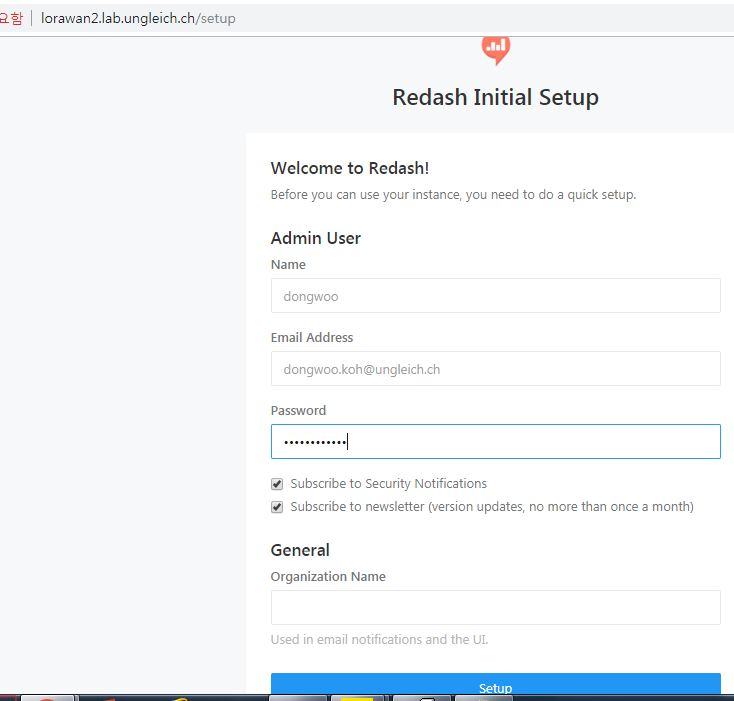
- File lorawan2.lab.ungleich.ch.JPG lorawan2.lab.ungleich.ch.JPG added
- File lorawan2.lab.ungleich.ch2.JPG lorawan2.lab.ungleich.ch2.JPG added
#. Working!!!!!!....--;;;
DK Updated by Dong Woo Koh almost 8 years ago
- % Done changed from 0 to 20
NS Updated by Nico Schottelius almost 8 years ago
Very cool, Dong Woo!
I mentioned to Jason yesterday: the next step is probably to get the data on an IPv6 only VM from https://www.thethingsnetwork.org/ (TTN). For this you will need to create an account there. Afterwards I can grant you access.
As TTN does not support IPv6 for pushing (HTTP POST) messages to us, we will need to pull messages, which will use NAT64. For this I recommened using an MQTT client. You find examples of it in https://code.ungleich.ch/ungleich-public/lorawan.
DK Updated by Dong Woo Koh almost 8 years ago
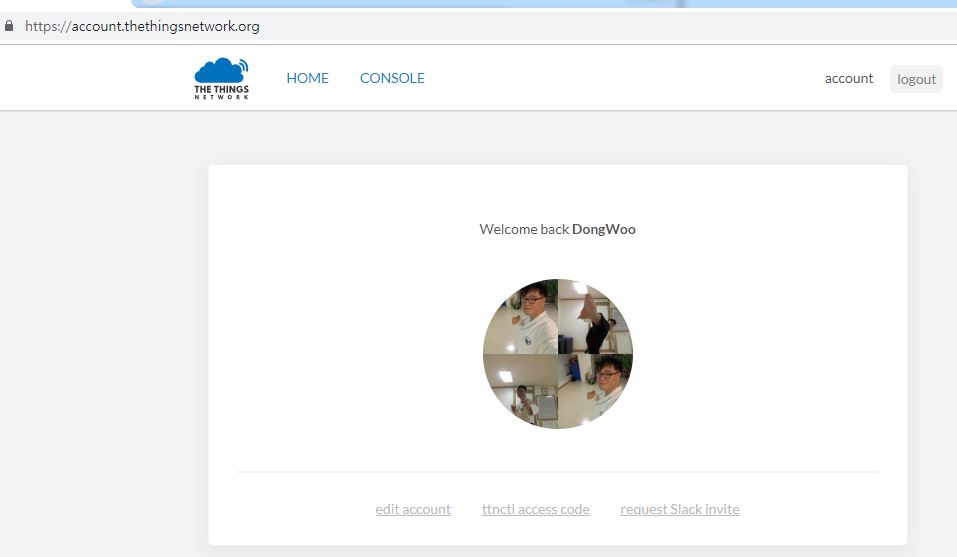
- File TTN_Join.JPG TTN_Join.JPG added
DK Updated by Dong Woo Koh almost 8 years ago
@Nico Schottelius, I joined TTN.org. with my email, dongwoo.koh@ungleich.ch
Thanks.
NS Updated by Nico Schottelius almost 8 years ago
I just granted you access - can you check https://console.thethingsnetwork.org/applications/datacenterlight/integrations ?
I think you will need to add a new integration so that you can connect using MQTT
DK Updated by Dong Woo Koh almost 8 years ago
NS Updated by Nico Schottelius almost 8 years ago
Very good!
Let me know, if you have any questions about how to continue!
redmine@ungleich.ch writes:
DK Updated by Dong Woo Koh almost 8 years ago
#.Postgresql Installed installed into "lorawan2.lab.ungleich.ch" again manually
: for temperature sensor's DB
--> I decided not to use postsql of docker container (:= this will be used only for redash)
#. I made new DB ("lorawanDB") with user : "postgres"
-bash-4.2$ psql lorawanDB
psql (9.2.24)
Type "help" for help.

lorawanDB=# \l
                                  List of databases
   Name    |  Owner   | Encoding |   Collate   |    Ctype    |   Access privileg
es
-----------+----------+----------+-------------+-------------+------------------
-----
 lorawanDB | postgres | UTF8     | en_US.UTF-8 | en_US.UTF-8 |                         <---------------------------
 postgres  | postgres | UTF8     | en_US.UTF-8 | en_US.UTF-8 |
 template0 | postgres | UTF8     | en_US.UTF-8 | en_US.UTF-8 | =c/postgres
    +
           |          |          |             |             | postgres=CTc/post
gres
 template1 | postgres | UTF8     | en_US.UTF-8 | en_US.UTF-8 | =c/postgres
    +
           |          |          |             |             | postgres=CTc/post
gres
(4 rows)

lorawanDB=# GRANT ALL PRIVILEGES ON DATABASE "lorawanDB" to postgres;
GRANT
lorawanDB=# \l
                                  List of databases
   Name    |  Owner   | Encoding |   Collate   |    Ctype    |   Access privileg
es
-----------+----------+----------+-------------+-------------+------------------
-----
 lorawanDB | postgres | UTF8     | en_US.UTF-8 | en_US.UTF-8 | =Tc/postgres         <---------------------------
    +
           |          |          |             |             | postgres=CTc/post
gres
 postgres  | postgres | UTF8     | en_US.UTF-8 | en_US.UTF-8 |
 template0 | postgres | UTF8     | en_US.UTF-8 | en_US.UTF-8 | =c/postgres
    +
           |          |          |             |             | postgres=CTc/post
gres
 template1 | postgres | UTF8     | en_US.UTF-8 | en_US.UTF-8 | =c/postgres
    +
           |          |          |             |             | postgres=CTc/post
gres
(4 rows)

lorawanDB=#
DK Updated by Dong Woo Koh almost 8 years ago
#checking opened ports win nmap i(in outside postion)
: 5342 port(posgresql) not opened.
[root@cephmaster dongwoo]# nmap lorawan2.lab.ungleich.ch

Starting Nmap 6.40 ( http://nmap.org ) at 2018-12-23 11:40 KST
Nmap scan report for lorawan2.lab.ungleich.ch (185.203.114.149)
Host is up (0.32s latency).
rDNS record for 185.203.114.149: 149-114-203-185.place5.ungleich.ch
Not shown: 991 closed ports
PORT     STATE    SERVICE
22/tcp   open     ssh
80/tcp   open     http
111/tcp  open     rpcbind
135/tcp  filtered msrpc
139/tcp  filtered netbios-ssn
445/tcp  filtered microsoft-ds
1720/tcp filtered H.323/Q.931
4444/tcp filtered krb524
5000/tcp open     upnp
#. Checking ports (in lorawan2.lab.ungleich.ch)
[root@lorawan2 ~]# netstat -tlnp
Active Internet connections (only servers)
Proto Recv-Q Send-Q Local Address           Foreign Address         State       PID/Program name
tcp        0      0 0.0.0.0:111             0.0.0.0:*               LISTEN      1/systemd
tcp        0      0 0.0.0.0:22              0.0.0.0:*               LISTEN      1260/sshd
tcp        0      0 127.0.0.1:5432          0.0.0.0:*               LISTEN      17665/postgres  <---------------
tcp        0      0 127.0.0.1:25            0.0.0.0:*               LISTEN      1641/master
tcp6       0      0 :::111                  :::*                    LISTEN      1/systemd
tcp6       0      0 :::80                   :::*                    LISTEN      12624/docker-proxy-
tcp6       0      0 :::22                   :::*                    LISTEN      1260/sshd
tcp6       0      0 ::1:5432                :::*                    LISTEN      17665/postgres
tcp6       0      0 ::1:25                  :::*                    LISTEN      1641/master
tcp6       0      0 :::5000                 :::*                    LISTEN      12414/docker-proxy-
[root@lorawan2 ~]#
#. firewall is not working(in lorawan2.lab.*)
: So, I try to modify posgresql configuration
DK Updated by Dong Woo Koh almost 8 years ago
#. postgresql(5432) port openning SUCCESS!!
: for redash
[root@lorawan2 ~]# find / -name pg_hba.conf
/var/lib/pgsql/data/pg_hba.conf
/opt/redash/postgres-data/pg_hba.conf
[root@lorawan2 ~]# cat /var/lib/pgsql/data/pg_hba.conf
# PostgreSQL Client Authentication Configuration File
# ===================================================
#
...

# TYPE  DATABASE        USER            ADDRESS                 METHOD

# "local" is for Unix domain socket connections only
local   all             all                                     peer
# IPv4 local connections:
host    all             all             127.0.0.1/32            ident
# IPv6 local connections:
host    all             all             ::1/128                 ident
# Allow replication connections from localhost, by a user with the
# replication privilege.
#local   replication     postgres                                peer
#host    replication     postgres        127.0.0.1/32            ident
#host    replication     postgres        ::1/128                 ident
host    all             all             185.203.114.1/32        trust      <------------
host    all             all             2a0a:e5c0:2:2::/64      trust       <------------
[root@lorawan2 ~]# find / -name postgresql.conf
/var/lib/pgsql/data/postgresql.conf
/usr/lib/tmpfiles.d/postgresql.conf
/opt/redash/postgres-data/postgresql.conf
[root@lorawan2 ~]# vi /var/lib/pgsql/data/postgresql.conf
[root@lorawan2 ~]# cat /var/lib/pgsql/data/postgresql.conf
# -----------------------------
# PostgreSQL configuration file
# -----------------------------
#
...

#------------------------------------------------------------------------------
# CONNECTIONS AND AUTHENTICATION
#------------------------------------------------------------------------------

# - Connection Settings -

#listen_addresses = 'localhost'         # what IP address(es) to listen on;
                                        # comma-separated list of addresses;
                                        # defaults to 'localhost'; use '*' for all
                                        # (change requires restart)
listen_addresses = '*'                         <------------------------------
#port = 5432                            # (change requires restart)
# Note: In RHEL/Fedora installations, you can't set the port number here;
# adjust it in the service file instead.
max_connections = 100                   # (change requires restart)
# Note:  Increasing max_connections costs ~400 bytes of shared memory per
# connection slot, plus lock space (see max_locks_per_transaction).
#superuser_reserved_connections = 3     # (change requires restart)
#unix_socket_directories = '/var/run/postgresql, /tmp'  # comma-separated list of directories
                                        # (change requires restart)
...
[root@cephmaster dongwoo]# nmap lorawan2.lab.ungleich.ch

Starting Nmap 6.40 ( http://nmap.org ) at 2018-12-23 12:27 KST
Nmap scan report for lorawan2.lab.ungleich.ch (185.203.114.149)
Host is up (0.32s latency).
rDNS record for 185.203.114.149: 149-114-203-185.place5.ungleich.ch
Not shown: 990 closed ports
PORT     STATE    SERVICE
22/tcp   open     ssh
80/tcp   open     http
111/tcp  open     rpcbind
135/tcp  filtered msrpc
139/tcp  filtered netbios-ssn
445/tcp  filtered microsoft-ds
1720/tcp filtered H.323/Q.931
4444/tcp filtered krb524
5000/tcp open     upnp
5432/tcp open     postgresql           <------------------------------------ Port Open SUCCESS!! for redash
DK Updated by Dong Woo Koh almost 8 years ago
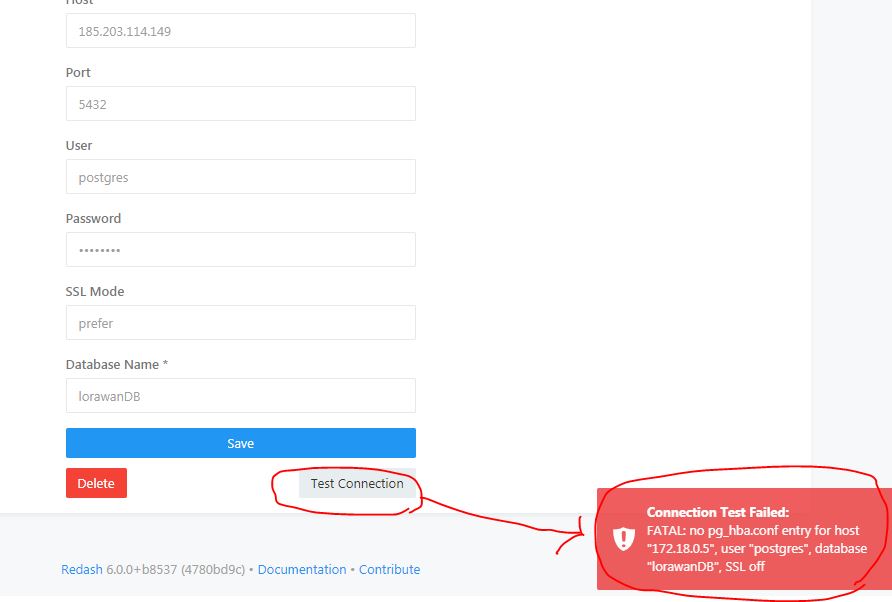
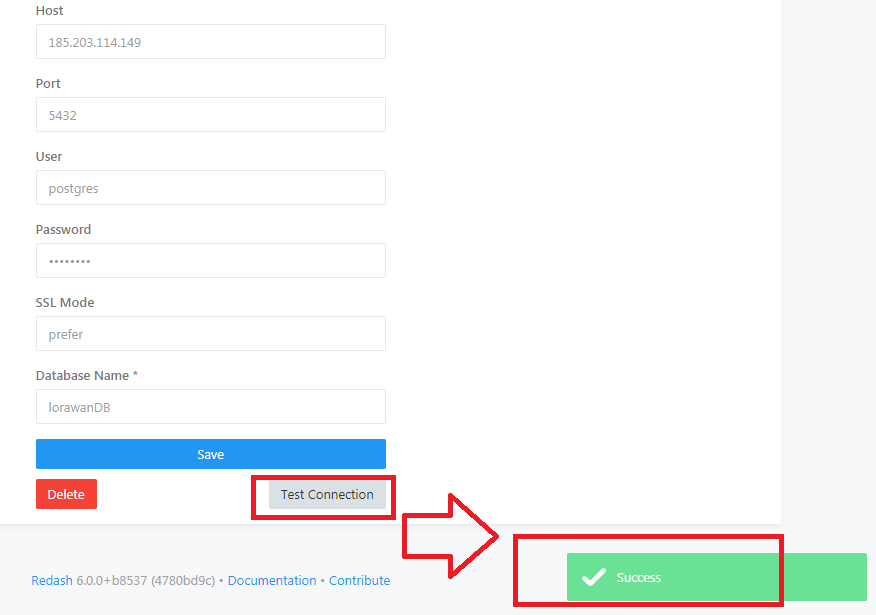
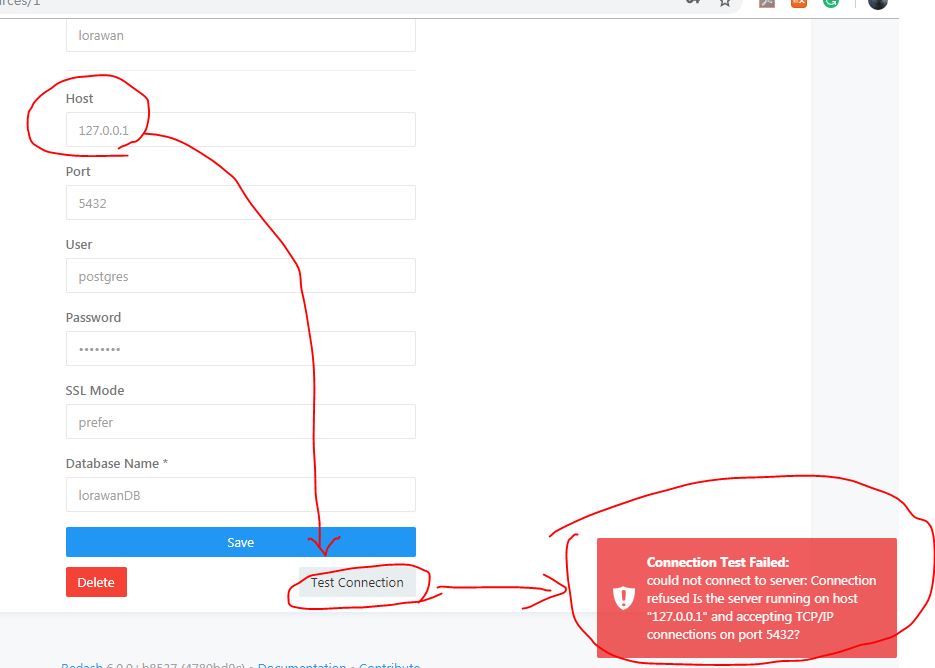
#.Different kind error found (refer attached file)
: So,I put docker's IP:172.18.0.5. Finally I checked success message.
DK Updated by Dong Woo Koh almost 8 years ago
NS Updated by Nico Schottelius almost 8 years ago
2 hints Dong-Woo:
- Usually data base servers should only listen on ::1 or 127.0.0.1, or even better only on a unix socket. This way you do not need to worry about security
- If opening up the database port, I strongly suggest to use the IPv6 address and not the IPv4 address
To continue, I strongly suggest to try to get the data from TTN in the next step
DK Updated by Dong Woo Koh almost 8 years ago
That's why I use public IP with v4, I could not solve the attached problem with "localhost 127.0.0.1" in redash.
Can you give some advice?
After solving this problem, I'll try to get data from TTN.
Thanks.
My configuration, here.
# TYPE  DATABASE        USER            ADDRESS                 METHOD

# "local" is for Unix domain socket connections only
local   all             all                                     peer
# IPv4 local connections:
host    all             all             127.0.0.1/32            ident
# IPv6 local connections:
host    all             all             ::1/128                 ident
# Allow replication connections from localhost, by a user with the
# replication privilege.
#local   replication     postgres                                peer
#host    replication     postgres        127.0.0.1/32            ident
#host    replication     postgres        ::1/128                 ident
#host   all             all             172.18.0.5/32           trust
#------------------------------------------------------------------------------
# CONNECTIONS AND AUTHENTICATION
#------------------------------------------------------------------------------

# - Connection Settings -

listen_addresses = 'localhost'          # what IP address(es) to listen on;
                                        # comma-separated list of addresses;
                                        # defaults to 'localhost'; use '*' for all
                                        # (change requires restart)
#listen_addresses = '*'
#port = 5432
DK Updated by Dong Woo Koh almost 8 years ago
It seems that "localhost" is regarded as "localhost" of redash container.
DK Updated by Dong Woo Koh almost 8 years ago
[root@lorawan2 ~]# git clone https://code.ungleich.ch/ungleich-public/lorawan.git
Cloning into 'lorawan'...
remote: Enumerating objects: 630, done.
remote: Counting objects: 100% (630/630), done.
remote: Compressing objects: 100% (196/196), done.
remote: Total 630 (delta 431), reused 619 (delta 424)
Receiving objects: 100% (630/630), 114.78 KiB | 0 bytes/s, done.
Resolving deltas: 100% (431/431), done.
#. Reference
Websocket은 TCP socket과 많이 닮았지만, 차이점도 있다.
그 차이점은 브라우저에서 서버로 양방향 커뮤니케이션 연결을 시도 한다는 점이다.
웹소켓이 위치하면서 웹브라우저에서 웹 어플리케이션을 위한 first class MQTT 지원이 가능해졌습니다.
IBM과 Eurotech(Arcom)에 의해 1999년 최초 개발
센서/장치 + 모바일 기기들의 연결을 위한 프로토콜
MQTT 프로토콜 오픈소스로 공개 (http://www.mqtt.org)
단순하고 미니멀한 Pub/Sub 메시징 체제
– 기업 경계 박의 Edge 네트워크 장치와 기업 내의 백엔드 애플리케이션 간 메시지 교환에 접합
– 간편한 메시징을 위한 직관적 verb set(connect/disconnect publish/subscribe) 제공
오버헤드를 최소화
– 가장 작은 메시지 사이즈는 2byte: 가변길이 MQTT헤더 + 애플리케이션 Payload
– Payload 데이터에 중립적: 별도의 다른 애플리케이션 헤더 불필요
– 클라이언트 라이브러리: C버전은 30KB, Java 버전은 100KB 내외
Pub/Sub에 있어서 메시징 신뢰성을 위한 세가지 QoS(Quality of Service) 레벨 제공
– 반드시 전달되어야하는 중요 메시지에 대한 전달 보장
– QoS 0 : 한 번만 전달하고 전달 여부는 확인하지 않음.
– QoS 1 : 적어도 한 번 이상 전달하고 전달 여부 확인.
– QoS 2 : 4단계의 핸드셰이킹(handshaking)을 통해 정확히 한 번만 전달.
DK Updated by Dong Woo Koh almost 8 years ago
#. Checking.....ttnv2receiver.py
#!/usr/bin/env python3

import urllib
import psycopg2
import websocket
from http.server import BaseHTTPRequestHandler, HTTPServer
import re
import json
import pprint
import lorautil
import base64

# HTTPRequestHandler class
class testHTTPServer_RequestHandler(BaseHTTPRequestHandler):  <-----------------
    def do_POST(self):
        length = int(self.headers['Content-Length'])
        post_data = self.rfile.read(length).decode('utf-8')

        print(post_data)

        payload = self.payload_hex(post_data)   <===================
        deveui = self.get_deveui(post_data)

        # Try to decode to unicode
        try:
            payload = self.data_to_unicode(payload) <************
        except UnicodeDecodeError:
            pass

        print("deveui/payload: {}:{}".format(deveui, payload))

        # And insert into the db
        lorautil.db_insert_json("ttn", post_data, payload, deveui)
        lorautil.db_notify("ttn", payload, deveui)

    def payload_hex(self, data):     <===================
        mydict = lorautil.jsonToDict(data)
        return mydict['payload_raw']

    def data_to_unicode(self, myhex):  <************
        return base64.b64decode(myhex).decode('utf-8')

    def get_deveui(self, data):
        mydict = lorautil.jsonToDict(data)
        return mydict['hardware_serial']

if __name__ == '__main__':
    server_address = ('::', 7000)
    httpd = HTTPServer(server_address, testHTTPServer_RequestHandler) <-------------------
    print('running server...')
    httpd.serve_forever()
#. lorautil.py
# Helper functions for various Lora receivers
# Nico Schottelius <nico.schottelius -at- ungleich.ch>
# 2016-11-02
# GPLv3+

import psycopg2
import json
import logging

import select
import psycopg2
import psycopg2.extensions
import sys
import time
import websocket

logging.basicConfig(format='%(levelname)s: %(message)s')
log = logging.getLogger(__name__)

dbname="lorawan"

def db_notify(provider, payload='', deveui=''):
    notify="{}:{}".format(deveui, payload)
    log.debug("Notify: {} {}".format(provider, notify))
    try:
        conn = psycopg2.connect("dbname={}".format(dbname))
        cursor = conn.cursor()

        cursor.execute("select pg_notify (%s, %s)",  (provider, notify))
        cursor.connection.commit()
    except Exception as e:
        log.error("DB Notify failed: %s" % e)

def db_insert_json(provider, data, payload='', deveui=''):
    try:
        conn = psycopg2.connect("dbname={}".format(dbname))
        cursor = conn.cursor()
        cursor.execute("insert into packets values (DEFAULT, DEFAULT, %s, %s, %s, %s)",  (provider, data, payload, deveui))
        cursor.connection.commit()

        conn.close()
    except Exception as e:
        log.error("DB Insert failed: %s" % e)

def jsonToDict(data):
    return json.loads(data)

def nodered_from_stdin():
    provider = sys.argv[1]
    for line in sys.stdin:
        print("{} -> {}".format(provider, line))
        nodered_send(provider,line)
        time.sleep(0.1)

def nodered_send(path, data):
    ws = websocket.create_connection("ws://localhost:1880/{}".format(path))
    ws.send("%s" % data)
    ws.close()

channels = [ "loriot", "swisscom", "ttn" ]

def pg_conn_notify():
    conns = []
    for channel in channels:
        conn = psycopg2.connect("dbname={}".format(dbname))
        conn.set_isolation_level(psycopg2.extensions.ISOLATION_LEVEL_AUTOCOMMIT)

        curs = conn.cursor()
        curs.execute("LISTEN {};".format(channel))

        conns.append(conn)
        log.debug("Waiting for notifications on channel {}".format(channel))

    return conns

def pg_wait_for_pkg(conns, callback):
    readable, writable, exceptional = select.select(conns,[],[])

    for conn in readable:
        conn.poll()
        while conn.notifies:
            notify = conn.notifies.pop(0)
            log.debug("Got NOTIFY: {} {} {}".format(notify.pid, notify.channel, notify.payload))

            callback(notify.channel, notify.payload)

class DB(object):
    def __init__(self, query):
        self.query = query

    @classmethod
    def gps_query(cls, since="1 day"):
        return cls("select payload from packets where payload like 'lat%' and received_dt > NOW() - '{}'::INTERVAL".format(since))

    def __iter__(self):
        try:
            self.conn = psycopg2.connect("dbname={}".format(dbname))
            self.cursor = self.conn.cursor()
            self.cursor.execute(self.query)
        except Exception as e:
            log.error("DB query failed: %s" % e)
            raise

        return self

    def __next__(self):
        data = self.cursor.fetchone()
        if not data:
            self.conn.close()
            raise StopIteration

        return data
DK Updated by Dong Woo Koh almost 8 years ago
#. It made new one : lorawan-dev-receivier.py
[root@lorawan2 python]# cat lorawan-dev-receivier.py
#!/usr/bin/env python3

import urllib
import psycopg2
import websocket
from http.server import BaseHTTPRequestHandler, HTTPServer
import re
import json
import pprint
import lorautil
import base64

# HTTPRequestHandler class
class testHTTPServer_RequestHandler(BaseHTTPRequestHandler):
    def do_POST(self):
        length = int(self.headers['Content-Length'])
        post_data = self.rfile.read(length).decode('utf-8')

        print(post_data)

        payload = self.payload_hex(post_data)
        deveui = self.get_deveui(post_data)

        # Try to decode to unicode
        try:
            payload = self.data_to_unicode(payload)
        except UnicodeDecodeError:
            pass

        print("deveui/payload: {}:{}".format(deveui, payload))

        # And insert into the db
        lorautil.db_insert_json("lorawanDB", post_data, payload, deveui)   <------------ lorawanDB maded in postgresql
        lorautil.db_notify("lorawanDB", payload, deveui)                <------------ lorawanDB maded in postgresql

    def payload_hex(self, data):
        mydict = lorautil.jsonToDict(data)
        return mydict['payload_raw']

    def data_to_unicode(self, myhex):
        return base64.b64decode(myhex).decode('utf-8')

    def get_deveui(self, data):
        mydict = lorautil.jsonToDict(data)
        return mydict['hardware_serial']

if __name__ == '__main__':
    server_address = ('::', 7000)
    httpd = HTTPServer(server_address, testHTTPServer_RequestHandler)
    print('running server...')
    httpd.serve_forever()
DK Updated by Dong Woo Koh almost 8 years ago
- File lorawan-dev.ttn.JPG lorawan-dev.ttn.JPG added
DK Updated by Dong Woo Koh almost 8 years ago
[root@lorawan2 python]# python ./lorawan-dev-receivier.py
Traceback (most recent call last):
  File "./lorawan-dev-receivier.py", line 4, in <module>
    import psycopg2
ImportError: No module named psycopg2
[root@lorawan2 python]# yum install build-dep python-psycopg2
Loaded plugins: fastestmirror
Loading mirror speeds from cached hostfile
 * base: mirror.spreitzer.ch
 * epel: mirror.spreitzer.ch
 * extras: mirror.spreitzer.ch
 * updates: mirror.spreitzer.ch
No package build-dep available.
Resolving Dependencies
--> Running transaction check
---> Package python-psycopg2.x86_64 0:2.5.1-3.el7 will be installed
--> Finished Dependency Resolution
...
[root@lorawan2 python]# python ./lorawan-dev-receivier.py
Traceback (most recent call last):
  File "./lorawan-dev-receivier.py", line 5, in <module>
    import websocket
ImportError: No module named websocket
[root@lorawan2 python]# yum install python-websocket-client
Loaded plugins: fastestmirror
Loading mirror speeds from cached hostfile
 * base: mirror.spreitzer.ch
 * epel: mirror.spreitzer.ch
 * extras: mirror.spreitzer.ch
 * updates: mirror.spreitzer.ch
Resolving Dependencies
--> Running transaction check
---> Package python-websocket-client.noarch 0:0.32.0-116.el7 will be installed
...
DK Updated by Dong Woo Koh almost 8 years ago
#.
[root@lorawan2 python]# python ./lorawan-dev-receivier.py
Traceback (most recent call last):
  File "./lorawan-dev-receivier.py", line 6, in <module>
    from http.server import BaseHTTPRequestHandler, HTTPServer
ImportError: No module named http.server
#.reference....
: http.server is Python 3-only....
#. Trying to install python 3
: Reference
https://www.digitalocean.com/community/tutorials/how-to-install-python-3-and-set-up-a-local-programming-environment-on-centos-7
DK Updated by Dong Woo Koh almost 8 years ago
#. Step 1 — Preparing the System

sudo yum -y update

sudo yum -y install yum-utils

sudo yum -y groupinstall development

#. Step 2 — Installing and Setting Up Python 3

sudo yum -y install https://centos7.iuscommunity.org/ius-release.rpm

sudo yum -y install python36u

[root@lorawan2 python]# python3.6 -V
Python 3.6.5

sudo yum -y install python36u-pip
[root@lorawan2 python]# python3.6 ./lorawan-dev-receivier.py
Traceback (most recent call last):
  File "./lorawan-dev-receivier.py", line 4, in <module>
    import psycopg2
ModuleNotFoundError: No module named 'psycopg2'
DK Updated by Dong Woo Koh almost 8 years ago
[root@lorawan2 python]# python3 ./lorawan-dev-receivier.py
Traceback (most recent call last):
  File "./lorawan-dev-receivier.py", line 4, in <module>
    import psycopg2
ModuleNotFoundError: No module named 'psycopg2'
[root@lorawan2 python]# pip install psycopg2
Collecting psycopg2
  Downloading https://files.pythonhosted.org/packages/bc/2a/61a8f9719bd6df5b421abd91740cb0595fc3c17b28eaf89fe4f144472ca6/psycopg2-2.7.6.1-cp36-cp36m-manylinux1_x86_64.whl (2.7MB)
    100% |████████████████████████████████| 2.7MB 335kB/s
Installing collected packages: psycopg2
Successfully installed psycopg2-2.7.6.1
You are using pip version 9.0.1, however version 18.1 is available.
You should consider upgrading via the 'pip install --upgrade pip' command.
[root@lorawan2 python]# python3 ./lorawan-dev-receivier.py
/usr/lib64/python3.6/site-packages/psycopg2/__init__.py:144: UserWarning: The psycopg2 wheel package will be renamed from release 2.8; in order to keep installing from binary please use "pip install psycopg2-binary" instead. For details see: <http://initd.org/psycopg/docs/install.html#binary-install-from-pypi>.
  """)
Traceback (most recent call last):
  File "./lorawan-dev-receivier.py", line 5, in <module>
    import websocket
ModuleNotFoundError: No module named 'websocket'
[root@lorawan2 python]# pip install websocket
Collecting websocket
  Downloading https://files.pythonhosted.org/packages/f2/6d/a60d620ea575c885510c574909d2e3ed62129b121fa2df00ca1c81024c87/websocket-0.2.1.tar.gz (195kB)
    100% |████████████████████████████████| 204kB 3.1MB/s
Collecting gevent (from websocket)
  Downloading https://files.pythonhosted.org/packages/0b/e5/8bbad57fa8a565e04c696e3413d4051cc3cbb40d04c5d6ad9808ba991d5c/gevent-1.3.7-cp36-cp36m-manylinux1_x86_64.whl (4.5MB)
    100% |████████████████████████████████| 4.5MB 197kB/s
Collecting greenlet (from websocket)
  Downloading https://files.pythonhosted.org/packages/bf/45/142141aa47e01a5779f0fa5a53b81f8379ce8f2b1cd13df7d2f1d751ae42/greenlet-0.4.15-cp36-cp36m-manylinux1_x86_64.whl (41kB)
    100% |████████████████████████████████| 51kB 6.5MB/s
Installing collected packages: greenlet, gevent, websocket
  Running setup.py install for websocket ... done
Successfully installed gevent-1.3.7 greenlet-0.4.15 websocket-0.2.1
You are using pip version 9.0.1, however version 18.1 is available.
You should consider upgrading via the 'pip install --upgrade pip' command.
[root@lorawan2 python]# python3 ./lorawan-dev-receivier.py
/usr/lib64/python3.6/site-packages/psycopg2/__init__.py:144: UserWarning: The psycopg2 wheel package will be renamed from release 2.8; in order to keep installing from binary please use "pip install psycopg2-binary" instead. For details see: <http://initd.org/psycopg/docs/install.html#binary-install-from-pypi>.
  """)
Traceback (most recent call last):
  File "./lorawan-dev-receivier.py", line 50, in <module>
    httpd = HTTPServer(server_address, testHTTPServer_RequestHandler)
  File "/usr/lib64/python3.6/socketserver.py", line 453, in __init__
    self.server_bind()
  File "/usr/lib64/python3.6/http/server.py", line 136, in server_bind
    socketserver.TCPServer.server_bind(self)
  File "/usr/lib64/python3.6/socketserver.py", line 467, in server_bind
    self.socket.bind(self.server_address)
socket.gaierror: [Errno -9] Address family for hostname not supported
#. I need address.......where??????....
DK Updated by Dong Woo Koh almost 8 years ago
NS Updated by Nico Schottelius almost 8 years ago
Last comment looks good!
DK Updated by Dong Woo Koh almost 8 years ago
@Nico Schottelius
Thanks.
#. Puttin address...with lorawan2.lab.ungleich(185.203.114.149') into "./lorawan-dev-receivier.py"
if __name__ == '__main__':
#    server_address = ('fe80::b9ff:fecb:7295', 7000)
    server_address = ('185.203.114.149', 7000)
    httpd = HTTPServer(server_address, testHTTPServer_RequestHandler)
    print('running server...')
    httpd.serve_forever()
#. "[root@lorawan2 python]# python3 ./lorawan-dev-receivier.py" is running, but... It still has the DB connection problem
[root@lorawan2 python]# python3 ./lorawan-dev-receivier.py
/usr/lib64/python3.6/site-packages/psycopg2/__init__.py:144: UserWarning: The psycopg2 wheel package will be renamed from release 2.8; in order to keep installing from binary please use "pip install psycopg2-binary" instead. For details see: <http://initd.org/psycopg/docs/install.html#binary-install-from-pypi>.
  """)
running server...
#. I checked "metadata" for study
{"app_id":"datacenterlight","dev_id":"risinghf-29","hardware_serial":"8CF9574000000932","port":8,"counter":14756,"payload_raw":"AcNfUpYATx/D",

"metadata":{"time":"2018-12-28T08:43:26.338583736Z","frequency":867.3,
"modulation":"LORA", <------
"data_rate":"SF12BW125","coding_rate":"4/5", <------

"gateways":[{"gtw_id":"eui-0000024b08030ac5","timestamp":3876410756,"time":"","channel":4,
"rssi":-103, <------
#. Rssi Unusable
-30 dBm    Amazing
-67 dBm    Very Good
-70 dBm    Okay
-80 dBm    Not Good
-90 dBm    Unusable

"snr":6.2,  <-------  #typically -19.5dB(bad) to -3dB (good).
"rf_chain":0,
"latitude":46.92678,"longitude":8.99965,"altitude":620}]}, <------

"downlink_url":"https://integrations.thethingsnetwork.org/ttn-eu/api/v2/down/datacenterlight/lorawan-dev?key=ttn-account-v2.j-tH0-g_sDc5D15Hu94H6YdvplhU1SpJP9dRe8PtZMw"}
deveui/payload: 8CF9574000000932:AcNfUpYATx/D
ERROR: DB Insert failed: FATAL:  role "root" does not exist      <------

ERROR: DB Notify failed: FATAL:  role "root" does not exist      <------
DK Updated by Dong Woo Koh almost 8 years ago
- File glarus_googlemap.JPG glarus_googlemap.JPG added
#.Checking below condition of "./lorawan-dev-receivier.py"
# And insert into the db
        lorautil.db_insert_json("lorawan", post_data, payload, deveui)
        lorautil.db_notify("lorawan", payload, deveui)
def db_insert_json(provider, data, payload='', deveui=''):
    try:
        conn = psycopg2.connect("dbname={}".format(dbname))
        cursor = conn.cursor()
        cursor.execute("insert into packets values (DEFAULT, DEFAULT, %s, %s, %s, %s)",  (provider, data, payload, deveui))
        cursor.connection.commit()

        conn.close()
    except Exception as e:
        log.error("DB Insert failed: %s" % e)
NS Updated by Nico Schottelius almost 8 years ago
Cool, you ARE receiving data already!
The error you have is because there is no role root in your postgres
database.
I highly suggest to create a new user, "app", create a role for it and
then use this user instead of root.
redmine@ungleich.ch writes:
NS Updated by Nico Schottelius almost 8 years ago
Marc, this task is interesting for you to watch. Dong Woo has gotten the MQTT part up and running.
Dong Woo, Marc, I suggest that you ping each other in the infrastructure channel and exchange your experiences!
NS Updated by Nico Schottelius almost 8 years ago
Note: the location is always the location of the gateway, not of the device.
DK Updated by Dong Woo Koh almost 8 years ago
@Nico Schottelius
I'll follow your suggestion.
Thanks for your comment.
DK Updated by Dong Woo Koh almost 8 years ago
#. Checking Error ...
: FATAL: role "root" does not exist
#.Reference
"Most of the Linux users are trying to log in PostgreSQL using root user. But actually, this is wrong."
[root@lorawan2 python]# sudo passwd postgres
Changing password for user postgres.
New password:
Retype new password:
passwd: all authentication tokens updated successfully.
[root@lorawan2 python]# sudo -u postgres createuser app -d -P         <----- adding 'app' by nico's suggestion
could not change directory to "/root/lorawan/python"
Enter password for new role:
Enter it again:
[root@lorawan2 python]#
DK Updated by Dong Woo Koh almost 8 years ago
- % Done changed from 20 to 30
DK Updated by Dong Woo Koh almost 8 years ago
<lorawan-dev-receivier.py:=ttnv2receiver.py> lorautil.db_insert_json("lorawanDB", post_data, payload, deveui)
<lorautil.py> def db_insert_json(provider, data, payload='', deveui=''):
<lorautil.py> cursor.execute("insert into packets values (DEFAULT, DEFAULT, %s, %s, %s, %s)",  (provider, data, payload, deveui))
[root@lorawan2 ~]# su - postgres
Last login: Sat Dec 29 13:44:10 UTC 2018 on pts/0
-bash-4.2$ createdb lorawan
-bash-4.2$ psql lorawan
psql (9.2.24)
Type "help" for help.

lorawan=# CREATE TABLE packets (DEFAULT1 varchar,DEFAULT2 varchar, provider varhar,data varchar,payload varchar,deveui varchar);
CREATE TABLE
lorawan=#
DK Updated by Dong Woo Koh almost 8 years ago
[root@lorawan2 ~]# su - postgres
Last login: Sat Dec 29 14:20:22 UTC 2018 on pts/0
-bash-4.2$ psql lorawan -U app
Password for user app:
psql (9.2.24)
Type "help" for help.

lorawan=> \l
                                  List of databases
   Name    |  Owner   | Encoding |   Collate   |    Ctype    |   Access privileges
-----------+----------+----------+-------------+-------------+-----------------------
 lorawan   | postgres | UTF8     | en_US.UTF-8 | en_US.UTF-8 | =Tc/postgres         +
           |          |          |             |             | postgres=CTc/postgres
 postgres  | postgres | UTF8     | en_US.UTF-8 | en_US.UTF-8 |
 template0 | postgres | UTF8     | en_US.UTF-8 | en_US.UTF-8 | =c/postgres          +
           |          |          |             |             | postgres=CTc/postgres
 template1 | postgres | UTF8     | en_US.UTF-8 | en_US.UTF-8 | =c/postgres          +
           |          |          |             |             | postgres=CTc/postgres
(4 rows)
DK Updated by Dong Woo Koh almost 8 years ago
#. Changing Configuration ( /var/lib/pgsql/data/pg_hba.conf)
# TYPE  DATABASE        USER            ADDRESS                 METHOD

# "local" is for Unix domain socket connections only
local   all             all                                     md5               <------------------replpace "peer" with "md5"
# IPv4 local connections:
host    all             all             127.0.0.1/32            ident
# IPv6 local connections:
host    all             all             ::1/128                 ident
# Allow replication connections from localhost, by a user with the
# replication privilege.
#local   replication     postgres                                peer
#host    replication     postgres        127.0.0.1/32            ident
#host    replication     postgres        ::1/128                 ident
host    all             all             172.18.0.8/32           trust
[root@lorawan2 python]
#. Checked with "-u app".....working well
[root@lorawan2 python]# psql lorawan -U app
Password for user app:
psql (9.2.24)
Type "help" for help.

lorawan=>
[root@lorawan2 python]# cat lorautil.py
# Helper functions for various Lora receivers
# Nico Schottelius <nico.schottelius -at- ungleich.ch>
# 2016-11-02
# GPLv3+

import psycopg2
import json
import logging

import select
import psycopg2
import psycopg2.extensions
import sys
import time
import websocket

logging.basicConfig(format='%(levelname)s: %(message)s')
log = logging.getLogger(__name__)

dbname="lorawan"

def db_notify(provider, payload='', deveui=''):
    notify="{}:{}".format(deveui, payload)
    log.debug("Notify: {} {}".format(provider, notify))
    try:
#       conn = psycopg2.connect("dbname={}".format(dbname))
#       conn = psycopg2.connect("dbname='lorawan' user='app' host='localhost' password='6dd6bbdfe1dxxxxxxxxxxxxxxxxxx'")
        conn = psycopg2.connect("dbname=lorawan user=app host=localhost password=tbvjaos08!")    <-------------------- not working
        cursor = conn.cursor()

        cursor.execute("select pg_notify (%s, %s)",  (provider, notify))
        cursor.connection.commit()
    except Exception as e:
        log.error("DB Notify failed: %s" % e)

def db_insert_json(provider, data, payload='', deveui=''):
    try:
#        conn = psycopg2.connect("dbname={}".format(dbname))
#        conn = psycopg2.connect("dbname='lorawan' user='app' host='localhost' password='6dd6bbdfe1xxxxxxxxxxxxxxxxxxx'")
         conn = psycopg2.connect("dbname=lorawan user=app host=localhost password=tbvjaos08!")    <-------------------- not working
        cursor = conn.cursor()
        cursor.execute("insert into packets values (DEFAULT, DEFAULT, %s, %s, %s, %s)",  (provider, data, payload, deveui))
        cursor.connection.commit()

        conn.close()
    except Exception as e:
        log.error("DB Insert failed: %s" % e)
...
#.Reference
DK Updated by Dong Woo Koh almost 8 years ago
#.Psql connection error
{"app_id":"datacenterlight","dev_id":"risinghf-9","hardware_serial":"4776E6ED001A0041","port":8,"counter":15534,"payload_raw":"AURkRpYAfiLA","metadata":{"time":"2018-12-31T02:15:30.918754439Z","frequency":868.3,"modulation":"LORA","data_rate":"SF12BW125","coding_rate":"4/5","gateways":[{"gtw_id":"eui-0000024b08030ac5","timestamp":3577789548,"time":"","channel":1,"rssi":-53,"snr":9.8,"rf_chain":1}]},"downlink_url":"https://integrations.thethingsnetwork.org/ttn-eu/api/v2/down/datacenterlight/lorawan-dev?key=ttn-account-v2.j-tH0-g_sDc5D15Hu94H6YdvplhU1SpJP9dRe8PtZMw"}
deveui/payload: 4776E6ED001A0041:AURkRpYAfiLA
ERROR: DB Insert failed: FATAL:  Ident authentication failed for user "app" <----------------

ERROR: DB Notify failed: FATAL:  Ident authentication failed for user "app" <----------------
DK Updated by Dong Woo Koh almost 8 years ago
DK Updated by Dong Woo Koh almost 8 years ago
#. The problem was "host=localhost" !!!!
conn = psycopg2.connect("dbname=lorawan user=app host=localhost password=tbvjaos08!") <-------------------- not working
conn = psycopg2.connect("dbname=lorawan user=app password=tbvjaos08!") <-------------------- working !!!!
#. But Another problem
{"app_id":"datacenterlight","dev_id":"risinghf-19","hardware_serial":"8CF957400000095A","port":8,"counter":15539,"payload_raw":"AXBmSZYAUyDK","metadata":{"time":"2018-12-31T03:15:18.874645151Z","frequency":867.9,"modulation":"LORA","data_rate":"SF12BW125","coding_rate":"4/5","gateways":[{"gtw_id":"eui-0000024b08030ac5","timestamp":2870775524,"time":"","channel":7,"rssi":-115,"snr":3,"rf_chain":0,"latitude":46.92669,"longitude":8.99956,"altitude":658}]},"downlink_url":"https://integrations.thethingsnetwork.org/ttn-eu/api/v2/down/datacenterlight/lorawan-dev?key=ttn-account-v2.j-tH0-g_sDc5D15Hu94H6YdvplhU1SpJP9dRe8PtZMw"}
deveui/payload: 8CF957400000095A:AXBmSZYAUyDK
ERROR: DB Insert failed: permission denied for relation packets           <-------------------another error
DK Updated by Dong Woo Koh almost 8 years ago
[root@lorawan2 python]# psql lorawan -U app
Password for user app:
psql (9.2.24)
Type "help" for help.

lorawan=> select * from packets;
ERROR:  permission denied for relation packets
[root@lorawan2 python]# psql -d lorawan
Password:
psql: FATAL:  password authentication failed for user "root"
DK Updated by Dong Woo Koh almost 8 years ago
#. I changed into "Peer" mode from "md5" in order to granting all privileges to "app"
-bash-4.2$ psql lorawan
psql (9.2.24)
Type "help" for help.

lorawan=# GRANT ALL PRIVILEGES ON ALL TABLES IN SCHEMA public TO app;
GRANT
#. Finally Success!!!!!!!!!!!!!!!!!!!!!!!!!!!!!!
[root@lorawan2 python]# psql lorawan -U app
Password for user app:
psql (9.2.24)
Type "help" for help.

lorawan=> select * from packets;
 default1 | default2 | provider  |

                       data

                 |   payload    |      deveui
----------+----------+-----------+--------------------------------------------------------------------------------------------------------------------------------------
------------------------------------------------------------------------------------------------------------------------------------------------------------------------
------------------------------------------------------------------------------------------------------------------------------------------------------------------------
------------------------------------------------------------------------------------------------------------------------------------------------------------------------
-----------------+--------------+------------------
          |          | lorawanDB | {"app_id":"datacenterlight","dev_id":"risinghf-3","hardware_serial":"4776E6ED00480056","port":8,"counter":5201,"payload_raw":"AZxMrpY
AmSK7","metadata":{"time":"2018-12-31T03:51:58.977110352Z","frequency":867.7,"modulation":"LORA","data_rate":"SF12BW125","coding_rate":"4/5","gateways":[{"gtw_id":"eui-
0000024b080e1023","timestamp":1303044196,"time":"2018-12-31T03:51:58.877305Z","channel":6,"rssi":-29,"snr":10.8,"rf_chain":0,"latitude":46.9699,"longitude":9.03878,"alt
itude":538}]},"downlink_url":"https://integrations.thethingsnetwork.org/ttn-eu/api/v2/down/datacenterlight/lorawan-dev?key=ttn-account-v2.j-tH0-g_sDc5D15Hu94H6YdvplhU1S
pJP9dRe8PtZMw"}  | AZxMrpYAmSK7 | 4776E6ED00480056
          |          | lorawanDB | {"app_id":"datacenterlight","dev_id":"risinghf-14","hardware_serial":"8CF9574000000939","port":8,"counter":5187,"payload_raw":"gfhMoZ
YAgiHB","metadata":{"time":"2018-12-31T03:52:14.328168523Z","frequency":867.7,"modulation":"LORA","data_rate":"SF12BW125","coding_rate":"4/5","gateways":[{"gtw_id":"eui
-0000024b08030ae8","timestamp":1357667508,"time":"","channel":6,"rssi":-46,"snr":8.5,"rf_chain":0,"latitude":46.99244,"longitude":9.07256,"altitude":543}]},"downlink_ur
l":"https://integrations.thethingsnetwork.org/ttn-eu/api/v2/down/datacenterlight/lorawan-dev?key=ttn-account-v2.j-tH0-g_sDc5D15Hu94H6YdvplhU1SpJP9dRe8PtZMw"}
                 | gfhMoZYAgiHB | 8CF9574000000939
          |          | lorawanDB | {"app_id":"datacenterlight","dev_id":"risinghf-29","hardware_serial":"8CF9574000000932","port":8,"counter":15551,"payload_raw":"AXVgT
5YAUh3D","metadata":{"time":"2018-12-31T03:52:14.490248755Z","frequency":867.7,"modulation":"LORA","data_rate":"SF12BW125","coding_rate":"4/5","gateways":[{"gtw_id":"eu
i-0000024b08030ac5","timestamp":791420828,"time":"2018-12-31T03:52:23.438658Z","channel":6,"rssi":-94,"snr":9.5,"rf_chain":0,"latitude":46.92672,"longitude":8.99984,"al
titude":636}]},"downlink_url":"https://integrations.thethingsnetwork.org/ttn-eu/api/v2/down/datacenterlight/lorawan-dev?key=ttn-account-v2.j-tH0-g_sDc5D15Hu94H6YdvplhU1
SpJP9dRe8PtZMw"} | AXVgT5YAUh3D | 8CF9574000000932
(3 rows)
@Nico Schottelius @auer
It took a long time because I could not solve the minor problem in controlling the DBMS (I forgot much memories related DBMS. I did work again in 20 years.^^).
After rearranging my results in PPT, I'll share all procedure in brandnewchat with a few pictures.
Happy New Year.!!
DK Updated by Dong Woo Koh almost 8 years ago
#. Reference
[root@lorawan2 ~]# cat /etc/monitrc
###############################################################################
## Monit control file
###############################################################################
##
## Comments begin with a '#' and extend through the end of the line. Keywords
## are case insensitive. All path's MUST BE FULLY QUALIFIED, starting with '/'.
##
## Below you will find examples of some frequently used statements. For
## information about the control file and a complete list of statements and
## options, please have a look in the Monit manual.
##
##
###############################################################################
## Global section
###############################################################################
##
## Start Monit in the background (run as a daemon):
#
set daemon  30              # check services at 30 seconds intervals            <--------------
#   with start delay 240    # optional: delay the first check by 4-minutes (by
#                           # default Monit check immediately after Monit start)
#
#
## Set syslog logging. If you want to log to a standalone log file instead,
## specify the full path to the log file
#
set log syslog

#
#
## Set the location of the Monit lock file which stores the process id of the
## running Monit instance. By default this file is stored in $HOME/.monit.pid
#
# set pidfile /var/run/monit.pid
#
## Set the location of the Monit id file which stores the unique id for the
## Monit instance. The id is generated and stored on first Monit start. By
## default the file is placed in $HOME/.monit.id.
#
# set idfile /var/.monit.id
#. Monit can be managed on the web using port 2812, or you can receive notifications by e-mail
## Monit has an embedded HTTP interface which can be used to view status of
## services monitored and manage services from a web interface. The HTTP
## interface is also required if you want to issue Monit commands from the
## command line, such as 'monit status' or 'monit restart service' The reason
## for this is that the Monit client uses the HTTP interface to send these
## commands to a running Monit daemon. See the Monit Wiki if you want to
## enable SSL for the HTTP interface.
#
set httpd port 2812 and              <----------------
    use address localhost  # only accept connection from localhost
    allow localhost        # allow localhost to connect to the server and
    allow admin:monit      # require user 'admin' with password 'monit'
    #with ssl {            # enable SSL/TLS and set path to server certificate
    #    pemfile: /etc/ssl/certs/monit.pem
    #}
###############################################################################
## Includes
###############################################################################
##
## It is possible to include additional configuration parts from other files or
## directories.
#
include /etc/monit.d/* <-------
JK Updated by Jason Kim almost 8 years ago
- PM Check date changed from 12/09/2018 to 01/05/2019
DK Updated by Dong Woo Koh almost 8 years ago
- File TTN_Console_20181219_20190105_working01.pptx TTN_Console_20181219_20190105_working01.pptx added
@Nico Schottelius @auer Here is my material of TASK #6068 in progress. It is describing all procedure. Thanks.
DK Updated by Dong Woo Koh almost 8 years ago
DK Updated by Dong Woo Koh almost 8 years ago
[root@lorawan2 python]# cat /etc/systemd/system/lorawan.service
[Service]
ExecStart=/usr/bin/python3 /root/lorawan/python/ldr.py
Restart=always
StandardOutput=syslog
StandardError=syslog

[Install]
WantedBy=default.target
[root@lorawan2 system]# systemctl start lorawan
Warning: lorawan.service changed on disk. Run 'systemctl daemon-reload' to reload units.
[root@lorawan2 system]# systemctl daemon-reload
[root@lorawan2 system]# systemctl start lorawan
[root@lorawan2 system]# systemctl status lorawan
● lorawan.service
   Loaded: loaded (/etc/systemd/system/lorawan.service; disabled; vendor preset: disabled)
   Active: active (running) since Fri 2019-01-11 09:51:07 UTC; 12s ago
 Main PID: 23921 (python3)
    Tasks: 1
   Memory: 19.7M
   CGroup: /system.slice/lorawan.service
           └─23921 /usr/bin/python3 /root/lorawan/python/ldr.py

Jan 11 09:51:07 lorawan2 systemd[1]: Started lorawan.service.
DK Updated by Dong Woo Koh almost 8 years ago
#. I don't know to use the monit with python script file
[root@lorawan2 run]# cat /etc/monit.d/lorawan
check process lorawan with pidfile /var/run/lorawan.pid
   start = "systemctl start lorawan"
   stop = "systemctl stop lorawan

[root@lorawan2 sbin]# monit -t
/etc/monit.d/lorawan:2: Program does not exist: 'systemctl'
/etc/monit.d/lorawan:3: Program does not exist: 'systemctl'
DK Updated by Dong Woo Koh almost 8 years ago
#. I made small parser to extract rssi, snr, etc for trainning
#!/usr/bin/env python3

import urllib
import re
import json

post_data = """{"app_id":"datacenterlight","dev_id":"risinghf-17","hardware_serial":"8CF95740000008B3","port":8,"counter":8868,"payload_raw":"AZNbUZYAiSHC","metadata":{"time":"2019-01-13T02:48:12.509690453Z","frequency":868.3,"modulation":"LORA","data_rate":"SF12BW125","coding_rate":"4/5","gateways":[{"gtw_id":"eui-0000024b08030ae8","timestamp":4024506268,"time":"","channel":1,"rssi":-42,"snr":8.8,"rf_chain":1}]},"downlink_url":"https://integrations.thethingsnetwork.org/ttn-eu/api/v2/down/datacenterlight/lorawan-dev?key=ttn-account-v2.j-tH0-g_sDc5D15Hu94H6YdvplhU1SpJP9dRe8PtZMw"}"""

def get_data_parser_txt(Target_Tupple):
   t_colon = ":"
   t_comma = ","

   Target_Tupple_idx = post_data.find(Target_Tupple)
   print('_loc:{}'.format(Target_Tupple_idx))

   # Finding colon
   Target_Tupple_colon_idx = post_data.find(t_colon,Target_Tupple_idx)
   print('_loc_colon:{}'.format(Target_Tupple_colon_idx))

   # Finding Comma
   Target_Tupple_comma_idx = post_data.find(t_comma,Target_Tupple_idx)
   print('_loc_comma:{}'.format(Target_Tupple_comma_idx))

   TargetData = post_data[Target_Tupple_colon_idx+2: Target_Tupple_comma_idx-1];

   print ('{0}:{1}'.format(Target_Tupple,TargetData))

   return  TargetData

def get_data_parser_num(Target_Tupple):
   t_colon = ":"
   t_comma = ","

   Target_Tupple_idx = post_data.find(Target_Tupple)
   print('_loc:{}'.format(Target_Tupple_idx))

   # Finding colon
   Target_Tupple_colon_idx = post_data.find(t_colon,Target_Tupple_idx)
   print('_loc_colon:{}'.format(Target_Tupple_colon_idx))

   # Finding Comma
   Target_Tupple_comma_idx = post_data.find(t_comma,Target_Tupple_idx)
   print('_loc_comma:{}'.format(Target_Tupple_comma_idx))

   TargetData = post_data[Target_Tupple_colon_idx+1: Target_Tupple_comma_idx];

   print ('{0}:{1}'.format(Target_Tupple,TargetData))

   return  TargetData

if __name__ == '__main__':
      res = get_data_parser_txt('dev_id')
      if res:
            print(res[0][1:])

      res = get_data_parser_txt('time')
      if res:
            print(res[0][1:])

      res = get_data_parser_num('channel')
      if res:
            print(res[0][1:])

      res = get_data_parser_num('rssi')
      if res:
            print(res[0][1:])

      res = get_data_parser_num('snr')
      if res:
            print(res[0][1:])
DK Updated by Dong Woo Koh almost 8 years ago
DK Updated by Dong Woo Koh almost 8 years ago
#. I made new function at lorautil.py
def db_insert_json1(provider, dev_id, time, channel, rssi, snr , payload='', deveui=''):
    try:
        conn = psycopg2.connect("dbname=lorawan user=app password=tbvjaos08!")
        cursor = conn.cursor()
        cursor.execute("insert into packets1 values (DEFAULT, DEFAULT, %s, %s, %s, %s, %s, %s, %s, %s)",  (provider, dev_id, time, channel, rssi, snr, payload, deveui))
        cursor.connection.commit()

        conn.close()
    except Exception as e:
        log.error("DB Insert failed: %s" % e)
#. And I also put new codes in lorawan server file(my file name : ldr.py).
#!/usr/bin/env python3

import urllib
import psycopg2
import websocket
from http.server import BaseHTTPRequestHandler, HTTPServer
import re
import json
import pprint
import lorautil
import base64

# HTTPRequestHandler class
class testHTTPServer_RequestHandler(BaseHTTPRequestHandler):

    def do_POST(self):
        length = int(self.headers['Content-Length'])
        post_data = self.rfile.read(length).decode('utf-8')

        print(post_data)

        payload = self.payload_hex(post_data)
        deveui = self.get_deveui(post_data)

# Try to decode to unicode
        try:
            payload = self.data_to_unicode(payload)
        except UnicodeDecodeError:
            pass

        print("deveui/payload: {}:{}".format(deveui, payload))

#parser
        dev_id = get_data_parser_txt(post_data,'dev_id')
        print(dev_id[0][1:])

        time = get_data_parser_txt(post_data,'time')
        print(time[0][1:])

        channel = get_data_parser_num(post_data,'channel')
        print(channel[0][1:])

        rssi = get_data_parser_num(post_data,'rssi')
        print(rssi[0][1:])

        snr = get_data_parser_num(post_data, 'snr')
        print(snr[0][1:])

# And insert into the db
#lorautil.db_insert_json("lorawanDB", post_data, payload, deveui)
        lorautil.db_insert_json1("lorawanDB", dev_id, time, channel, rssi, snr, payload, deveui)

        lorautil.db_notify("lorawanDB", payload, deveui)

    def payload_hex(self, data):
        mydict = lorautil.jsonToDict(data)
        return mydict['payload_raw']

    def data_to_unicode(self, myhex):
        return base64.b64decode(myhex).decode('utf-8')

    def get_deveui(self, data):
        mydict = lorautil.jsonToDict(data)
        return mydict['hardware_serial']

def get_data_parser_txt(post_data, Target_Tupple):
    t_colon = ":"
    t_comma = ","

    Target_Tupple_idx = post_data.find(Target_Tupple)
    print('_loc:{}'.format(Target_Tupple_idx))

# Finding colon
    Target_Tupple_colon_idx = post_data.find(t_colon,Target_Tupple_idx)
    print('_loc_colon:{}'.format(Target_Tupple_colon_idx))

# Finding Comma
    Target_Tupple_comma_idx = post_data.find(t_comma,Target_Tupple_idx)
    print('_loc_comma:{}'.format(Target_Tupple_comma_idx))

    TargetData = post_data[Target_Tupple_colon_idx+2: Target_Tupple_comma_idx-1];

    print ('{0}:{1}'.format(Target_Tupple,TargetData))

    return  TargetData

def get_data_parser_num(post_data, Target_Tupple):
    t_colon = ":"
    t_comma = ","

    Target_Tupple_idx = post_data.find(Target_Tupple)
    print('_loc:{}'.format(Target_Tupple_idx))

# Finding colon
    Target_Tupple_colon_idx = post_data.find(t_colon,Target_Tupple_idx)
    print('_loc_colon:{}'.format(Target_Tupple_colon_idx))

# Finding Comma
    Target_Tupple_comma_idx = post_data.find(t_comma,Target_Tupple_idx)
    print('_loc_comma:{}'.format(Target_Tupple_comma_idx))

    TargetData = post_data[Target_Tupple_colon_idx+1: Target_Tupple_comma_idx];

    print ('{0}:{1}'.format(Target_Tupple,TargetData))

    return  TargetData

if __name__ == '__main__':
    #    server_address = ('fe80::b9ff:fecb:7295', 7000)
    server_address = ('185.203.114.149', 7000)
    httpd = HTTPServer(server_address, testHTTPServer_RequestHandler)
    print('running server...')
    httpd.serve_forever()
#. Checking Schema of New Table (=packet1)
lorawan=> select * from packets1;
ERROR:  permission denied for relation packets1
lorawan=> ^C
lorawan=> GRANT ALL PRIVILEGES ON DATABASE lorawan To app;
WARNING:  no privileges were granted for "lorawan"
GRANT
lorawan=> select * from packets1;
ERROR:  permission denied for relation packets1
lorawan=> GRANT ALL PRIVILEGES ON ALL TABLES IN SCHEMA public TO app;
WARNING:  no privileges were granted for "packets"
ERROR:  permission denied for relation packets1
lorawan=> ^Z
[2]+  Stopped                 psql lorawan -U app
-bash-4.2$
-bash-4.2$ psql lorawan
Password:
psql: FATAL:  password authentication failed for user "postgres"
-bash-4.2$ psql lorawan
Password: XXXX08
psql (9.2.24)
Type "help" for help.

lorawan=# GRANT ALL PRIVILEGES ON ALL TABLES IN SCHEMA public TO app;
GRANT
lorawan=# ^Z
[3]+  Stopped                 psql lorawan
-bash-4.2$ psql lorawan -U app
Password for user app: XXX08!
psql (9.2.24)
Type "help" for help.

lorawan=> select * from packets1;
 default1 | default2 | provider | dev_id | time | channel | rssi | snr | payload
 | deveui
----------+----------+----------+--------+------+---------+------+-----+--------
-+--------
(0 rows)
DK Updated by Dong Woo Koh over 7 years ago
- File data_gathering.JPG data_gathering.JPG added
#. It starts to gather parsing data for visualization study ^^
DK Updated by Dong Woo Koh over 7 years ago
- % Done changed from 30 to 40
DK Updated by Dong Woo Koh over 7 years ago
#. Here, visualization result(RSSI status) with Redash about LoraWan gadgets @linthal
: risinghf-27 is unusable.
JK Updated by Jason Kim over 7 years ago
- PM Check date changed from 01/05/2019 to 02/09/2019
JK Updated by Jason Kim over 7 years ago
- PM Check date changed from 02/09/2019 to 02/23/2019
NS Updated by Nico Schottelius over 7 years ago
- Project changed from 15 to queue
- Status changed from In Progress to New
- Assignee deleted (
Dong Woo Koh)
NS Updated by Nico Schottelius almost 3 years ago
- Status changed from New to Rejected